Drone-in-a-Box Systems Explained: How They Work + Best Platforms
BY Zacc Dukowitz
17 July 2026A drone in a box is an integrated system that stores a drone at or near the place where it will operate, then supports remote or automated missions from that location.
The “box” is a weather-resistant docking station where the drone can land, recharge, transfer data, and wait for its next mission. It can also be called a nest, dock, or charging station.
The terms drone dock and drone in a box are often used interchangeably, but they don’t mean the same thing—the dock is just one piece of the entire system.
Paired with remote flight software and an automated aircraft, a drone in a box can support missions like:
- Recurring inspections
- Emergency response
- Security patrols
Another way to think about a drone-in-a-box system is that it’s a permanent part of a site, not just a piece of portable equipment.

The Skydio Dock and Skydio X10 | Credit: Skydio
Similar to how permanently installed devices collect site data, a drone in a box collects data at regular intervals—it just flies to do so, instead of remaining stationary.
This guide explains how drone-in-a-box systems work, where they provide the most value, which systems are currently available, and what U.S. operators should consider before deploying one.
Here’s everything we cover:
- What Is a Drone in a Box?
- How Drone-in-a-Box Systems Work
- Top Drone-in-a-Box Systems on the Market
- 8 Most Common Drone-in-a-Box Uses
- 6 Things to Know Before Deploying a Drone-in-a-Box System
- Drone in a Box FAQ
What Is a Drone in a Box?
A drone in a box is designed to do something most drone programs still require a person to do: keep an aircraft ready at the site, launch it when needed, and prepare it for the next flight.
Instead of transporting a drone, batteries, and other equipment to a site for every flight, an organization can leave the drone in a permanent or semi-permanent dock.
When a mission begins, the dock opens, the drone launches automatically, and the aircraft flies its assigned mission before returning to recharge.
After returning to the box, the system prepares the drone to fly again by charging the installed battery or replacing it automatically. While the drone is charging, the box downloads the data it just collected, transferring it to a cloud platform where someone can use it to make maps, conduct inspections, or respond to a security alert.
The concept has existed for years, but recent advances in aircraft reliability, remote operations software, and docking technology have made drone-in-a-box systems practical for a much wider range of organizations than even five years ago.
What was once a niche enterprise technology is now becoming a common way to inspect infrastructure, monitor industrial facilities, and support Drone as First Responder (DFR) programs.
Pieces of a Drone in a Box System
What makes the system useful isn’t just the box itself.
It’s the combination of several parts working together:
- The drone and payload collect video, thermal imagery, mapping photos, or other mission data.
- The dock (or box) protects the aircraft and provides a consistent place to launch and land.
- The charging system restores the battery or swaps it for a charged one.
- The communications system connects the aircraft, dock, and remote operator.
- Mission-control software schedules flights, monitors the aircraft, and manages the fleet.
- The data platform stores, processes, and distributes what the drone collects.
- Human operators plan missions, supervise flights, respond to problems, and remain responsible for the operation.
Does “Drone in a Box” Mean Fully Autonomous?
Not necessarily.
Many drone-in-a-box systems can automate routine steps such as preflight checks, takeoff, route following, landing, charging, and data transfer.
But an automated mission follows instructions or conditions established in advance.
In reality, most commercial drone-in-a-box systems combine automation with human oversight.
The system may automatically launch, fly a planned route, avoid obstacles, land, recharge, and prepare for the next mission. But people still decide when missions should be flown, review the collected data, maintain the equipment, and remain responsible for operating safely and legally.
A more autonomous system, on the other hand, can make certain decisions during the mission, like navigating around an obstacle, adjusting its route, or responding to changing conditions.
How Drone-in-a-Box Systems Work
Most drone-in-a-box systems follow the same basic workflow.
Before launch, the system confirms the drone is ready to fly by checking battery status, communications, and aircraft health. Operators may also configure weather thresholds that prevent missions when conditions exceed safe operating limits.
The goal is to automate as much of the routine flying process as possible while still allowing a remote operator to monitor the mission and step in when needed.
Here’s an overview of how it works.
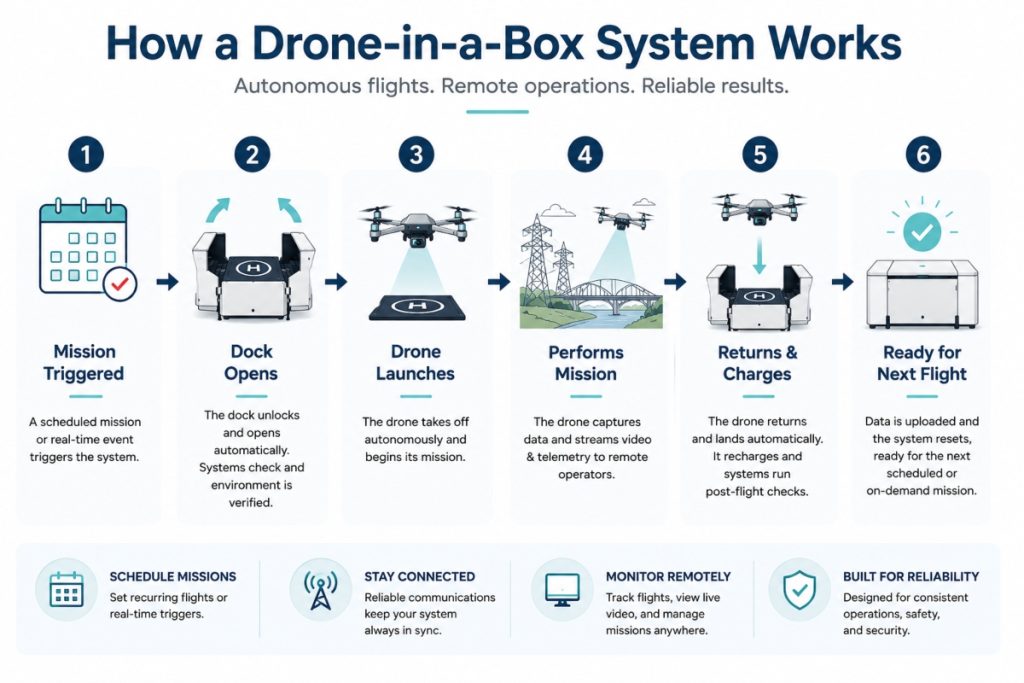
Here’s more information on each step covered in the diagram above:
Step 1: The Mission Is Triggered
Every drone-in-a-box mission begins with a trigger.
Some organizations schedule recurring flights, such as a utility company inspecting the same substation every morning or a construction team documenting weekly site progress. Others launch missions on demand when a remote operator requests one.
Public safety agencies increasingly use a third approach: event-triggered deployment. When a qualifying 911 call comes in, a remotely operated drone can launch from its dock and begin streaming live video toward the scene before responding officers arrive.
Step 2: The Dock Opens and the Drone Launches
Before takeoff, the system confirms the drone is ready to fly by checking battery status, communications, weather conditions, and the health of the aircraft. If those checks pass, the dock opens and the drone launches automatically.
Unlike a traditional drone operation, there’s no need for someone to unpack equipment or manually prepare the aircraft. The dock serves as the drone’s permanent home, keeping it charged, connected, and ready to fly.
Step 3: The Drone Completes Its Mission
Once airborne, the drone follows a planned flight path or receives instructions from a remote pilot.
Depending on the operation, it may capture high-resolution imagery, thermal data, mapping photos, or live video. Many systems transmit data in real time while also storing it for later review.
The level of automation varies by platform. Some missions are almost entirely pre-programmed, while others allow a remote operator to modify the flight as conditions change.
Step 4: The Drone Returns to the Dock
When the mission is complete, the drone lands back inside the dock using precision landing technology.
Automated landing is one of the key features that makes recurring, unattended operations practical. Once safely inside the dock, the aircraft is protected from the weather while the next stage of the workflow begins.
Step 5: The System Charges the Drone and Uploads Data
After landing, the dock prepares the aircraft for its next mission.
Most systems automatically recharge the battery, while some enterprise platforms replace depleted batteries with fully charged ones to reduce turnaround time. At the same time, the system uploads flight logs, synchronizes imagery, and reports any maintenance issues that require attention.
This automatic charging and data transfer allow organizations to collect recurring datasets without requiring someone to manually retrieve memory cards or swap batteries after every flight.
Step 6: The System Returns to a Ready State
Once charging and data transfer are complete, the drone remains on site, connected to power and communications, ready to launch again when needed.
That constant state of readiness is what makes drone-in-a-box systems so valuable for recurring operations. Whether the next mission is a scheduled inspection, a security patrol, or a rapid emergency response, the aircraft is already where it needs to be.
Automation Doesn’t Mean Nobody Is Responsible
One of the biggest misconceptions about drone-in-a-box technology is that the system operates all on its own.
But the truth is that people remain responsible for how these systems operate.
People still:
- Plan missions
- Monitor operations
- Maintain equipment
- Review data
- Make sure flights comply with applicable regulations
The dock reduces routine manual work, but it doesn’t eliminate operational oversight.
That’s why organizations evaluating these systems should think beyond the hardware.
A successful deployment depends on reliable communications, mission-management software, data workflows, maintenance procedures, and trained personnel working together—not simply on having a drone that can recharge itself.
Top Drone-in-a-Box Systems on the Market
The drone-in-a-box market has expanded rapidly over the past few years, with systems designed for everything from public safety and industrial inspections to long-range infrastructure monitoring.
Rather than trying to identify a single “best” platform, it’s more useful to compare systems based on the types of missions they’re designed to support. Here are some of the leading drone-in-a-box solutions on the market today.
1. DJI Dock 3 + Matrice 4D / Matrice 4TD

Good for: Public safety, infrastructure inspections, utility work, industrial facilities, mapping
DJI Dock 3 is the company’s latest autonomous docking system and one of the most widely adopted drone-in-a-box platforms available today. Designed around the Matrice 4D and thermal-equipped Matrice 4TD, it supports fully remote deployments while integrating with DJI FlightHub 2 for fleet management and mission planning.
Building on DJI’s earlier dock ecosystem, Dock 3 supports both fixed and vehicle-mounted deployment, expanded environmental protection, and improved remote operations for enterprise users.
- Compatible aircraft: DJI Matrice 4D and Matrice 4TD
- Flight time: Up to ~54 minutes (Matrice 4D series)
- Dock deployment: Fixed or vehicle-mounted
- Integrated charging and automated launch/recovery
- Remote fleet management through DJI FlightHub 2
- Supports RGB and thermal payloads (4TD)
2. Skydio Dock + Skydio X10

Good for: Drone as First Responder (DFR), security, utilities, industrial inspections
Skydio Dock is built around autonomous capture and remote operations, making it especially popular with public safety agencies. The company has become one of the leaders in DFR deployments, with more than 1,000 Skydio Docks now deployed across public safety and enterprise customers.
The platform emphasizes autonomous navigation, AI-assisted obstacle avoidance, and centralized remote operations.
- Compatible aircraft: Skydio X10
- AI-powered autonomous navigation
- Designed for remote fleet management
- Integrated charging and weather-resistant dock
- RGB and thermal imaging options
- Strong focus on DFR and infrastructure inspection
3. Percepto Air Max

Good for: Industrial inspections, utilities, mining, energy, heavy manufacturing
Percepto approaches drone-in-a-box differently than many competitors. Rather than focusing primarily on the dock, the company has built a complete autonomous inspection platform that combines docked drones, AI-powered analytics, fleet management software, and cloud reporting.
The goal is to automate as much of the inspection workflow as possible—from collecting imagery to identifying anomalies and delivering inspection results.
- Designed for fully autonomous industrial inspections
- Cloud-based fleet management and reporting
- AI-assisted defect detection and analytics
- Supports recurring inspection missions
- Integrated dock with automatic charging
- Built for enterprise-scale deployments
4. JOUAV Automated Hangar Systems

Good for: Pipelines, transmission lines, rail corridors, large-area inspections
Unlike most drone-in-a-box systems, JOUAV’s automated hangars are designed around VTOL aircraft capable of covering long distances. That makes them well suited for inspecting linear infrastructure where endurance matters more than hovering performance.
Instead of focusing on individual facilities, these systems are designed to inspect assets spread across many miles.
- VTOL aircraft for long-range operations
- Automated hangar with launch and recovery
- Supports pipeline and transmission inspections
- Designed for BVLOS-style infrastructure workflows
- Longer endurance than multirotor platforms
- Enterprise mission planning software
5. Easy Aerial Raptor

Good for: Perimeter security, critical infrastructure, military installations, and government operations
Easy Aerial’s Raptor is an autonomous drone-in-a-box platform built for persistent aerial security. Rather than focusing on inspections or mapping, it’s designed to provide rapid situational awareness around sensitive facilities, automatically launching to investigate alarms, patrol perimeters, or support emergency response.
The system combines a weather-resistant docking station with autonomous flight software, allowing organizations to keep a drone ready for deployment around the clock.
- Fully autonomous launch, landing, and battery charging
- Weather-resistant drone dock for permanent outdoor deployment
- Flight time of up to approximately 50 minutes
- AI-assisted autonomous missions and remote fleet management
- Supports visible, thermal, and other enterprise payloads
- Designed for 24/7 security patrols and rapid incident response
How to Compare Drone-in-a-Box Systems
Choosing a drone-in-a-box system starts with understanding your operation—not comparing specifications.
A police department building a Drone as First Responder (DFR) program has very different requirements than a utility inspecting substations or a construction company documenting weekly progress. The best platform depends on the problem you’re trying to solve.
Here are some questions to keep in mind when comparing systems:
| Question | Why it matters |
|---|---|
| Will the drone operate from a fixed location? | Docked systems create the most value when missions begin from the same site. |
| How often will it fly? | Frequent, repeatable missions typically produce the strongest return on investment. |
| What payloads are required? | Inspection, mapping, thermal imaging, and security missions often require different sensors. |
| How will the mission be managed? | Software, fleet management, and remote operations are just as important as the aircraft itself. |
| Does the site have reliable power and connectivity? | Autonomous docks depend on dependable infrastructure to operate consistently. |
| Will the operation require additional FAA approvals? | Some missions—such as BVLOS operations—may require additional authorization. |
8 Most Common Drone-in-a-Box Uses
Drone-in-a-box systems work best when flights are frequent, repeatable, and tied to a fixed location. That’s why they’ve been adopted first in industries where organizations need to inspect the same assets repeatedly, respond quickly to events, or maintain continuous visibility over large facilities.
Here are some of the most common ways organizations are using drone-in-a-box systems today.
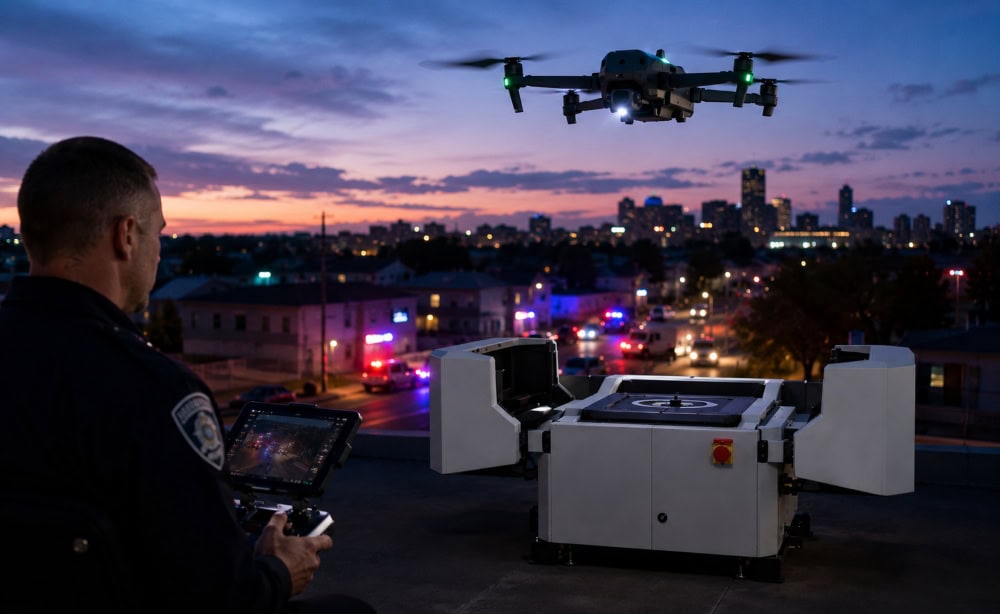
1. Drone as First Responder (DFR)
Drone as First Responder (DFR) programs have become one of the fastest-growing applications for drone-in-a-box technology. Instead of waiting for officers to arrive before launching a drone, agencies can dispatch a docked aircraft immediately after qualifying 911 calls, providing live aerial video while responders are still en route.
Early DFR programs focused on proving the technology worked. Today, agencies are increasingly building entire response models around networks of permanently installed docks, centralized remote pilots, and standardized operating procedures.
Here’s how drone-in-a-box systems are supporting DFR programs:
- Launching drones immediately after qualifying emergency calls
- Providing live aerial video before officers arrive
- Helping incident commanders assess evolving situations
- Supporting search operations and perimeter containment
- Reducing response times without increasing staffing
2. Infrastructure Inspections
Infrastructure operators routinely inspect the same assets over months and years, making them one of the best fits for autonomous docked systems. Flying identical routes on a regular schedule produces consistent datasets that are easier to compare over time than occasional manual inspections.
Here’s how drone-in-a-box systems are supporting infrastructure inspections:
- Electrical substations
- Transmission lines
- Pipeline facilities and compressor stations
- Solar farms and wind energy sites
- Bridges, rail infrastructure, and industrial plants
- Storage tanks, flare stacks, and process equipment
3. Security and Site Monitoring
Large facilities often need to investigate alarms, monitor perimeters, or patrol expansive sites without sending personnel into the field for every event. A permanently deployed drone provides an immediate aerial perspective whenever something requires investigation.
Here’s how drone-in-a-box systems are supporting security operations:
- Perimeter patrols
- Alarm verification
- Investigating suspicious vehicles or people
- Monitoring critical infrastructure
- Overnight and after-hours security patrols
4. Surveying and Mapping
Surveyors increasingly use docked drones to capture repeatable datasets without repeatedly sending crews into the field. Because each flight follows the same route, organizations can generate consistent orthomosaics, topographic maps, and volumetric measurements while tracking changes over time.
Here’s how drone-in-a-box systems are supporting surveying and mapping:
- Topographic surveys
- Orthomosaic generation
- Stockpile volume calculations
- Earthwork measurements
- Progress documentation
5. Construction Monitoring
Construction teams use drone-in-a-box systems to document projects throughout every stage of development. Automated flights provide a consistent visual record that helps project managers monitor schedules, coordinate contractors, and communicate progress with owners and stakeholders.
Here’s how drone-in-a-box systems are supporting construction projects:
- Weekly progress reports
- Site documentation
- Schedule verification
- Contractor coordination
- Visual reporting for stakeholders
6. Mining and Quarry Operations
Mining operations often cover large sites that require frequent inspections, stockpile measurements, and safety monitoring. Docked drones allow operators to automate many of these recurring flights while reducing travel across active work areas.
Here’s how drone-in-a-box systems are supporting mining operations:
- Stockpile measurements
- Pit and quarry monitoring
- Haul road inspections
- Equipment and infrastructure inspections
- Environmental compliance documentation
7. Port and Maritime Operations
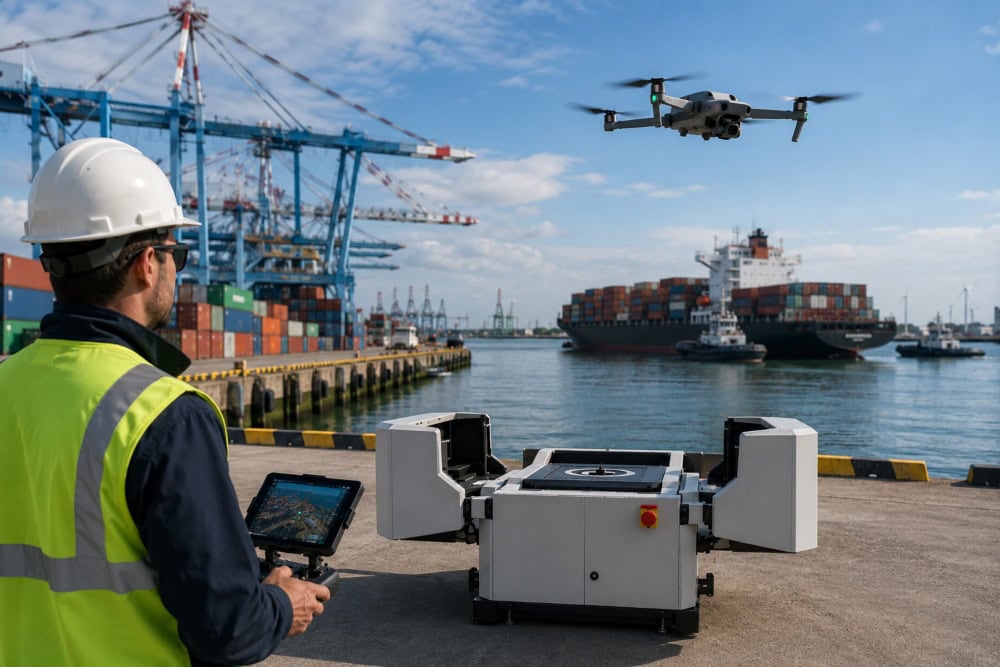
Ports, terminals, and other maritime facilities frequently need aerial visibility across large operational areas. A permanently deployed drone can quickly inspect docks, monitor vessel traffic, document cargo operations, or investigate incidents without waiting for a flight crew to arrive.
Here’s how drone-in-a-box systems are supporting ports and maritime operations:
- Port security patrols
- Dock and berth inspections
- Cargo yard monitoring
- Vessel traffic awareness
- Incident response around waterfront facilities
8. Emergency Management and Environmental Monitoring
Some organizations deploy docked drones to monitor developing incidents rather than respond to individual emergency calls. The ability to launch repeatedly from the same location makes drone-in-a-box systems well suited for long-duration events.
Here’s how drone-in-a-box systems are supporting emergency management:
- Wildfire monitoring
- Flood response
- Storm damage assessments
- Hazardous material incidents
- Environmental monitoring and compliance
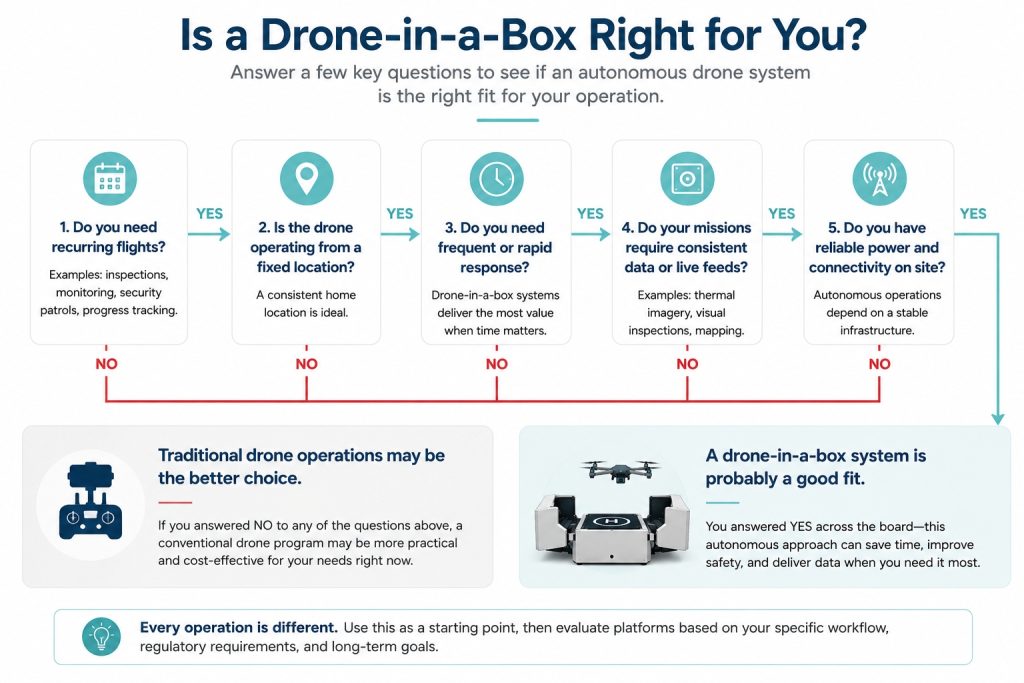
When Does a Drone-in-a-Box System Make Sense?
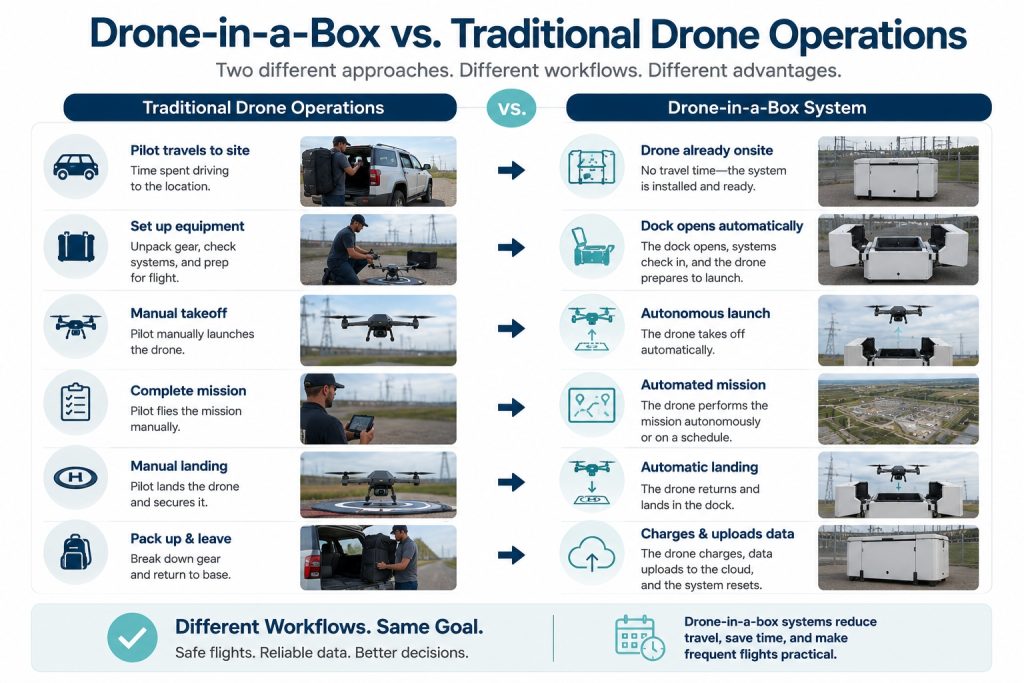
For organizations with recurring missions, a docked drone can reduce travel, shorten response times, and make it practical to collect data more frequently than a manually deployed aircraft.
For many organizations, the biggest savings don’t come from flying the drone itself—they come from eliminating all the work that surrounds each flight. Driving to a site, unpacking equipment, setting up the aircraft, and packing everything away again can easily take longer than the mission itself.
When those tasks happen several times a day at the same location, a permanently installed dock can transform the workflow. When they don’t, the additional cost and complexity may outweigh the benefits.
Here’s a quick way to think about it:
6 Things to Know Before Deploying a Drone-in-a-Box System
Drone-in-a-box systems can automate many parts of a drone operation, but they don’t eliminate the planning required to build a successful program.
In practice, the drone is often the simplest part of the deployment. Reliable infrastructure, maintenance procedures, regulatory planning, and data workflows usually have a much greater impact on long-term success than the aircraft itself.
Organizations that successfully scale drone-in-a-box programs tend to treat the dock as one component of a larger operational system rather than as a standalone piece of hardware.
1. Reliable Infrastructure Comes First
A dock needs dependable power, network connectivity, and a suitable installation site to operate consistently.
Before installing a drone-in-a-box system, ask questions like:
- Is reliable power available year-round?
- Will the dock have dependable cellular or network connectivity?
- Are takeoff and landing areas free of obstructions?
- Is the location protected from flooding, vehicle traffic, or other hazards?
- Can the site be accessed for inspections and maintenance?
Many organizations want to deploy docks at remote substations, pipeline facilities, solar farms, mines, and industrial plants—all environments where connectivity and infrastructure deserve careful planning before installation.
2. Weather Matters
Enterprise docks are designed to protect the aircraft while it’s on the ground, but they don’t eliminate weather limitations once the drone is airborne.
Organizations planning automated operations should evaluate:
- Maximum operating wind speeds
- Rain and precipitation limits
- Temperature operating ranges
- Visibility requirements
- Seasonal weather patterns at the deployment site
A rugged dock protects the aircraft between missions, but flight decisions still depend on the drone’s operating limitations.
3. Routine Maintenance Doesn’t Go Away
Drone-in-a-box systems reduce routine setup, not routine maintenance.
Even highly automated deployments still require regular inspections and preventive maintenance to remain reliable.
Expect to perform tasks such as:
- Firmware updates
- Battery health checks
- Propeller replacement
- Sensor calibration
- Dock inspections and cleaning
- Occasional aircraft repairs
Organizations planning unattended operations should establish maintenance schedules before deploying multiple docks.
4. Plan Your Data Workflow
One of the biggest advantages of drone-in-a-box systems is that they make frequent flights practical. But collecting more imagery doesn’t automatically produce better decisions.
Before expanding a deployment, decide:
- Who reviews inspection data?
- How will imagery be organized and stored?
- How will changes be tracked over time?
- Will findings integrate with existing asset management or maintenance software?
- Who receives alerts when issues are identified?
The goal isn’t simply to automate flights. It’s to create a workflow that consistently turns aerial data into useful operational decisions.
5. Understand FAA Requirements
Installing a drone in a dock doesn’t change the FAA rules that apply to the flight itself.
For most commercial operations, drone-in-a-box systems operate under Part 107 just like any other commercial drone. The dock automates parts of the workflow, but operators remain responsible for conducting safe and compliant flights.
A few important points to remember:
- Automated launch does not automatically mean the operation is BVLOS.
- Any required FAA approvals depend on the mission—not on whether the drone launches from a dock.
- Operations involving controlled airspace, BVLOS, or flights over people may require additional authorization.
- The FAA has proposed Part 108 to support routine BVLOS operations, but organizations should plan around the rules currently in effect while monitoring future regulatory developments.
Drone as First Responder (DFR) programs are a good example of why operational planning matters just as much as the technology itself.
6. Match the Technology to the Mission
Drone-in-a-box systems work best when flights are predictable, repeatable, and tied to a fixed location.
They’re often an excellent fit for recurring inspections, security patrols, and Drone as First Responder programs. They tend to be a poorer fit for operations that move from customer to customer, require frequent payload changes, or depend heavily on a pilot’s judgment during every flight.
Before investing in a system, ask yourself:
- Will this drone launch from the same location most of the time?
- Will we fly recurring missions on a regular schedule?
- Will automation reduce meaningful labor or travel time?
- Can our existing team support the system over the long term?
The strongest drone-in-a-box deployments begin with an operational problem—not a technology purchase. Organizations that identify a recurring need first, then choose a platform that fits that workflow, are far more likely to build a successful program.
Drone in a Box FAQ
Here are answers to some of the most commonly asked questions about drone in a box systems.
How much does a drone-in-a-box system cost?
There isn’t a single answer because a drone-in-a-box deployment is much more than a drone and a dock. Total costs typically include the aircraft, docking station, software, installation, networking, maintenance, training, and ongoing support. Organizations should evaluate the cost of the entire program rather than comparing hardware prices alone.
What Does the Dock Actually Do?
The dock is the permanent infrastructure that allows the entire drone in a box system to operate with minimal on-site intervention. It protects the drone from the weather, provides a secure place to land, recharges the battery between flights, and maintains communications with remote operators.
More advanced systems may also regulate temperature inside the enclosure, perform basic health checks, transfer flight data automatically, monitor battery condition, and report maintenance issues before they become operational problems.
Can a drone-in-a-box system fly without a pilot?
Many systems can automate takeoff, landing, charging, and routine flight paths. However, operators remain responsible for planning missions, monitoring operations, maintaining equipment, and complying with FAA requirements. The level of human involvement depends on both the technology and the type of operation.
Does every drone-in-a-box operation require BVLOS approval?
No. A drone can launch automatically while still operating within visual line of sight. Whether additional approval is required depends on how the mission is conducted rather than on the presence of a docking station.
Can drone-in-a-box systems operate in bad weather?
Most enterprise docks are designed for outdoor installation, but the aircraft itself still has operational weather limits. Wind, precipitation, icing, visibility, and temperature can all affect whether a mission can be flown safely.
What industries use drone-in-a-box systems?
Common users include public safety agencies, electric utilities, energy companies, industrial facilities, construction firms, mining operations, transportation agencies, and security organizations. These systems are generally most effective where flights occur repeatedly from the same location.
What’s the difference between a drone dock and a drone-in-a-box system?
A drone dock is the physical enclosure where the aircraft lands, charges, and waits for its next mission. A drone-in-a-box system includes the dock along with the aircraft, communications, software, data workflows, and operational procedures needed to conduct remote or automated missions.