What Is a TFR? Temporary Flight Restrictions Explained for Drone Pilots
BY Zacc Dukowitz
29 October 2026A presidential visit, nearby wildfire, or major sporting event can change where you’re allowed to fly your drone—even at a location where you’ve flown before.
Temporary flight restrictions, or TFRs, are one reason an otherwise routine flight may need to wait.
Before launching, you need to know whether a restriction covers your flight location, when it applies, and what it allows.
This guide explains what a TFR is, how to check for one, and how to read the details that affect your flight. It also covers when permission may be available and why an airspace authorization alone doesn’t settle the question.
Here’s everything we cover:
- What Is a Temporary Flight Restriction (TFR)?
- How to Check for TFRs Before Flying Your Drone
- How to Read a TFR Notice
- Common Types of TFRs Drone Pilots Encounter
- Can You Get Permission to Fly a Drone in a TFR?
- What If a TFR Appears or Changes During Your Flight?
- TFR Resources and Common Terms
- Frequently Asked Questions About TFRs
What Is a Temporary Flight Restriction (TFR)?
A TFR is an FAA restriction that limits aircraft operations—including drones—within a defined area of airspace for a specified period.
TFRs help protect people, aircraft, and sensitive activities during situations like disaster response, presidential travel, and certain major sporting events, like the Super Bowl.
A TFR has boundaries, altitude limits, and effective times. Its terms also identify which operations are restricted and which may be permitted.
A TFR can affect:
- Whether you can fly at a planned location.
- When you can take off and how long you can remain airborne.
- Your flight route and the area you can cover.
- The altitudes available for your operation.
- Whether you need additional permission or coordination before flying.
- Whether a photography job, inspection, or recreational flight needs to be moved or rescheduled.

Do TFRs Apply to Drones?
Yes. TFRs can restrict drone operations, including recreational flights and flights under Part 107.
For example, a restriction established for a presidential visit can affect a nearby drone photography job. And a wildfire restriction can prevent you from launching to capture footage of the response.
However, a TFR doesn’t necessarily prohibit every aircraft operation. Some notices allow specified activities or flights with the required authorization—and that’s why it’s important to know how to read them, so you can understand exactly what is and isn’t allowed.
[See the FAA’s drone-specific TFR guidance for more on how restrictions apply and why pilots must check them before flying.]
TFR vs. NOTAM: What’s the Difference?
A TFR is the restriction. A NOTAM—short for Notice to Airmen—is the notice used to communicate it.
NOTAMs cover much more than TFRs. They also communicate information like runway closures, navigation-equipment outages, and other changes or hazards affecting flight operations.
That means a NOTAM isn’t automatically a flight ban. When a NOTAM communicates a TFR, read its terms to determine whether your planned operation is affected.
For drone flight planning, the useful question is: Does this notice restrict my aircraft, location, altitude, or flight time?
→ Search for active NOTAMs on the FAA’s official portal.
How to Check for TFRs Before Flying Your Drone
Check for TFRs while planning your flight, then check again before takeoff.
An early check can help you avoid scheduling a job during a known restriction. The final check helps catch restrictions issued or changed since you made those plans.
Find Restrictions for Your Location and Flight Time
Start with the FAA’s official TFR website to find notices affecting the area where you plan to fly.
Consider the drone’s entire planned flight area, not just where you’ll stand with the controller—launching outside a restriction doesn’t allow you to fly into it.
For each relevant notice, check:
- Where the restricted airspace begins and ends.
- The altitude range it covers.
- Its effective dates, times, and any separate operating windows.
- Which operations are restricted or permitted.
Match those details to your planned flight. A nearby restriction may not overlap your operation, while one scheduled for later could affect you if the job runs long.
Open the full notice before deciding whether you can fly. A map helps you locate a restriction, but the notice supplies the conditions you need to interpret it.

Check FAA Resources and Airspace Apps
Airspace apps can make restrictions easier to spot alongside airports and other flight-planning information.
The FAA lists current B4UFLY service providers offering desktop and mobile airspace-awareness tools.
Applications from FAA-approved LAANC providers also supply TFR information alongside their airspace-authorization services.
Here are some of the apps you can use to check for TFRs:
Use these tools to identify restrictions, then review the applicable FAA notice.
If you’re flying near a major sporting venue, also consult the resources on the FAA’s stadium and sporting-event page.
Its Sporting Event Automated Monitoring System (SEAMS) provides event locations and restriction times, incorporating updates such as delays and overtime.
Recheck Before Takeoff
Make a fresh airspace check part of your on-site preflight routine—even if you checked the night before or already received an airspace authorization.
Confirm that your location, flight area, altitude, and expected operating time still match what you reviewed. If your plans change during the job, check whether the revised operation is affected.
For example, a morning photography flight may fall outside a restriction’s effective hours. Returning for sunset photos requires another check against that later flight time.
If a restriction affects your flight and you do not have the required permission, change the location or reschedule. If you can’t establish whether it applies, resolve that question before launching.
[A TFR check is just part of choosing a suitable flight location. See our guide to choosing a safe and legal place to fly for the broader planning considerations.]
How to Read a TFR Notice
A TFR notice tells you where and when a restriction applies, which operations it limits, and what exceptions exist.
Read those parts together: a flight can overlap the restricted area without qualifying for any of its permitted activities.
A TFR Notice Explained
The FAA’s Aeronautical Information Manual, Section 3-5-3, includes a training example involving rescue operations near Matthews, Virginia. This is an instructional example, not a current flight restriction.
Here is how its main elements fit together:
| Notice element | What the FAA example specifies | What it means for flight planning |
|---|---|---|
| 1. Location and boundaries | Within a two-nautical-mile radius of the named airfield. | Check the entire circle, which is four nautical miles across. |
| 2. Altitude limits | Airspace at and below 5,000 feet MSL. | The ceiling is measured from sea level, not from your launch point. |
| 3. Effective times | Effective immediately, ending at 9610211200. | The example’s end time is October 21, 1996, at 1200 UTC. |
| 4. Operating restrictions | Aircraft operations are prohibited except for the specified relief operations. | A routine photography flight is not permitted. |
| 5. Exceptions and contacts | Relief aircraft operating under Department of Defense direction are authorized. An official in charge and an FAA coordination facility are identified. | Your operation must meet the exception’s terms. Contact information does not create a general permission to enter. |
For a routine drone photography flight inside that example’s area and effective period, flying just above the ground wouldn’t avoid the restriction. The restricted airspace includes those lower altitudes, and the operation doesn’t meet the stated exception.
That’s why you have to read the full notice: so you can connect its boundaries, timing, and operating conditions to the flight you actually plan to make.
The Five Parts of a TFR
The annotated notice below shows a different example from the one covered above: FDC 6/3094 near Salinas, California, captured on October 28, 2026.
Its numbered callouts identify the five elements explained below. Use it for instruction, not current flight planning.
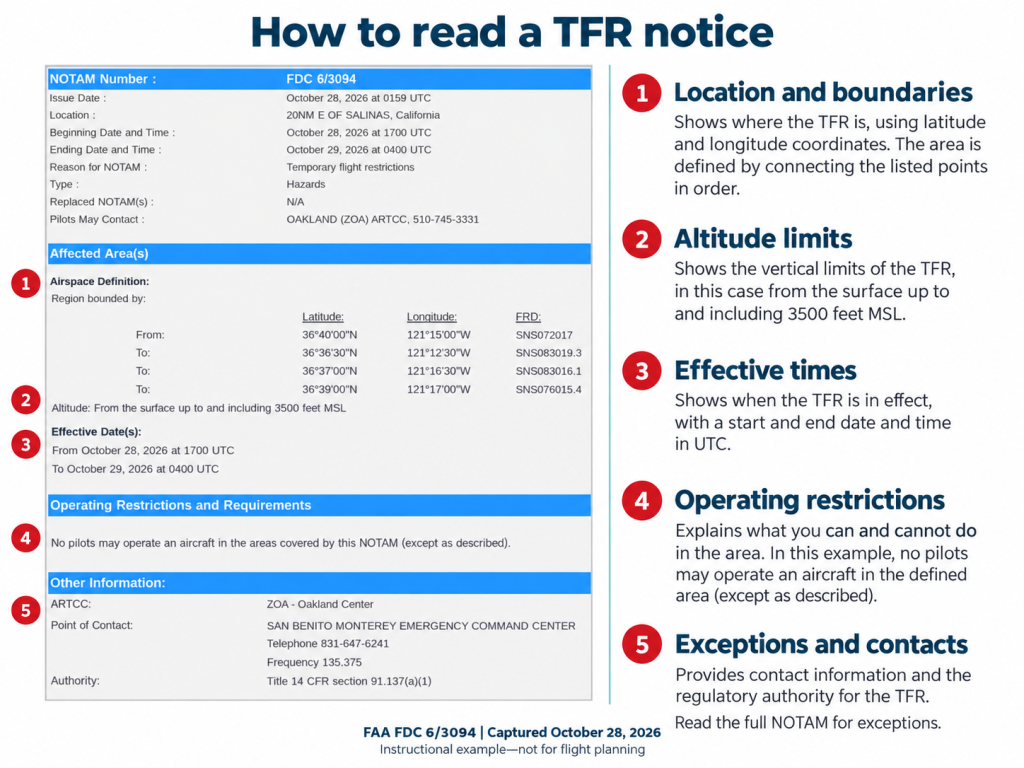
Here’s more information about each of the five parts:
1. Location and Boundaries
A restriction may describe a circle around a point, an area defined by coordinates, or several areas with different conditions. Check each area your flight could enter.
Also, pay attention to the units. A radius extends from the center to the boundary—it’s not the full width of the restricted area. One nautical mile is about 1.15 ordinary, or statute, miles.
2. Altitude Limits
Check both the lower and upper limits of the restricted airspace.
Here’s how to interpret them:
- SFC means the surface.
- AGL means above ground level.
- MSL means mean sea level.
A limit of 3,500 feet MSL doesn’t mean 3,500 feet above your launch site.
If the ground is at 3,000 feet MSL, that upper limit is only 500 feet above the ground at that location.
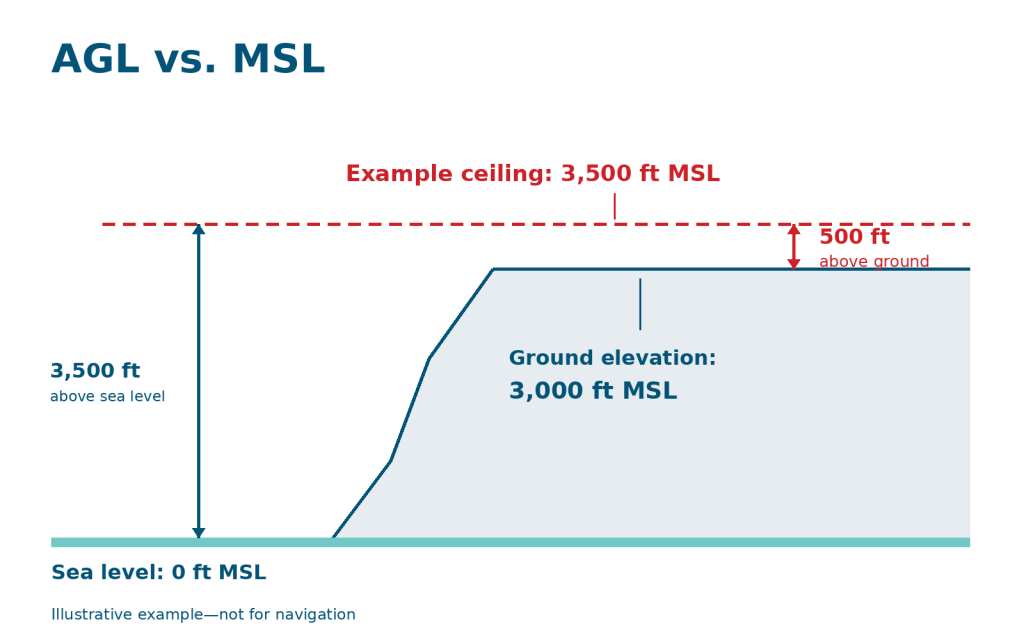
Note: Don’t assume your controller’s height reading uses the same reference as the notice. Establish what each measurement represents before comparing them.
3. Effective Times
The issue date tells you when the notice was published. The effective period tells you when the restriction applies.
NOTAM date-time groups use UTC, also called Zulu time. Convert them to the local time and date for your flight, accounting for daylight saving time where applicable.
For example, 1800 UTC is 2 p.m. Eastern Daylight Time but 1 p.m. Eastern Standard Time. The UTC time stays the same; the local offset changes.
A compact date-time group follows the order YYMMDDHHMM: year, month, day, hour, and minute.
Also, make sure to check for separate daily schedules or operating windows within the notice’s overall date range.
4. Operating Restrictions
Read which aircraft and activities the notice restricts. Look for provisions addressing unmanned aircraft. Permission for certain crewed aircraft to enter does not automatically permit a drone flight.
Compare the notice’s requirements with the operation you actually intend to conduct.
5. Exceptions and Contacts
Read any exceptions in full, including the conditions attached to them. If the notice permits an operation only with authorization, meeting the mission description alone isn’t enough.
Look for required coordination and approval before entry. Use the contact identified for the applicable process—a listed telephone number is not itself permission to fly.
The visual’s contact section helps you locate the responsible organization, but you still need to read the full NOTAM for applicable exceptions.
Common Types of TFRs Drone Pilots Encounter
Some TFRs are announced ahead of a scheduled event. Others respond to an emergency with little warning.
Knowing the common situations helps you anticipate disruptions, but the applicable notice determines the boundaries, times, and operating restrictions.

A crewed airplane flies during a wildfire operation in Australia
Wildfires and Disaster Response
→ Unless you are an authorized part of the response, keep your drone away—even if you haven’t found a TFR on your map.
Emergency TFRs can protect rescue aircraft, firefighting operations, and people exposed to hazards. Wildfires, hurricane recovery, and hazardous-material incidents are among the situations that can lead to restrictions.
These are working areas for emergency responders. An unrelated drone flight can create a collision risk or interrupt aircraft supporting crews on the ground.
The Department of the Interior warns that unauthorized drones near wildfires can force managers to suspend aerial firefighting operations.
For legitimate response or recovery work, coordinate through the applicable approval process before flying. Wanting to help doesn’t establish permission to enter.
Presidential and Other VIP Movements
TFRs can protect the president, vice president, and other designated public figures during travel. The affected airspace may cover arrival and departure locations, as well as places visited during the trip.
For drone pilots, the impact can extend well beyond the event venue. A photography or inspection job elsewhere in the area may fall inside the restriction.
VIP TFRs can contain multiple areas with different conditions.
Don’t assume that an outer area allowing some crewed aircraft also allows drones. Make sure to check the provisions for unmanned aircraft in every area your flight would enter.
Sporting Events
Certain major sporting events carry stadium flight restrictions. The FAA identifies events involving Major League Baseball, the NFL, NCAA Division I football, and specified major auto-racing series.
The standard stadium restriction extends three nautical miles from the venue—about 3.45 statute miles. That can affect a nearby real estate shoot or roof inspection even when the pilot has no intention of filming the event.
Check the restriction’s active window as well as its location. Game delays and overtime can affect when the restricted period ends, so a schedule checked days earlier may not settle whether you can fly.
Use the resources on the FAA’s sporting-event page, including SEAMS, to check event information. A venue owner’s permission to launch does not replace any required airspace approval.
Airshows, Space Operations, and Other Events
Airshows and space launch or recovery operations can also involve temporary flight restrictions.
These protect airspace needed for activities that may place aircraft or other hazards near your planned flight.
For a drone pilot filming near an airshow or launch site, being outside the spectator area doesn’t establish that the airspace is available. Check the restriction’s geographic coverage and operating windows before choosing a launch location.
Other security situations and unusual events can produce restrictions too. The FAA’s operating-restrictions guidance includes security events, such as the United Nations General Assembly.
Can You Get Permission to Fly a Drone in a TFR?
Sometimes.
Permission depends on the restriction, the purpose of your flight, and the approval conditions that apply to it.
Some TFRs allow specifically authorized drone operations supporting emergency response or other designated activities—but for most other activities, getting approval is unlikely.
What the Notice Allows
Start with the notice’s provisions for unmanned aircraft and any applicable exceptions.
Determine whether your operation fits a permitted category and whether it requires prior coordination, approval, or both.
For an ordinary job that does not qualify, moving the flight or waiting until the restriction ends is the practical choice.
The FAA directs drone pilots seeking access to a TFR to coordinate with the controlling agency listed in the restriction.
Describe the actual mission when seeking approval: where and when you need to fly, the proposed altitude, and what the operation supports.
And if you receive approval, follow its specific limits. Permission for one operation does not authorize unrelated flights elsewhere in the restricted area.
Why LAANC Approval Isn’t Enough
LAANC provides authorization to operate in certain controlled airspace. TFR permission addresses a separate restriction.
For example, you might receive LAANC authorization for a flight near an airport several days in advance. If a TFR later covers that location and flight time, the earlier authorization doesn’t override it.
The FAA’s LAANC operating procedures explicitly state that operators must also meet the requirements of applicable NOTAMs and TFRs.
Emergency Operations and the SGI Process
The FAA’s Special Governmental Interest (SGI) process provides expedited consideration for eligible emergency operations.
Examples include firefighting, search and rescue, law enforcement, critical infrastructure restoration, certain disaster-recovery damage assessments, and media coverage providing crucial public information.
A deadline alone does not make a flight eligible. The operation needs to support a qualifying emergency purpose, and any approval applies to the specified mission and conditions.
To apply, follow the instructions on the FAA’s emergency-operations page. The FAA directs applicants to the TSA/FAA Waiver & Airspace Access Program and the “Part 107 Special Government Interest” application option.
For time-sensitive operations, contact the FAA’s System Operations Support Center (SOSC) at 202-267-8276. Submitting a request does not authorize the flight; obtain approval before operating outside your existing permissions.
What If a TFR Appears or Changes During Your Flight?
If you learn that a new or changed TFR affects your airborne drone, our recommendation is to end the flight promptly and safely.
Keep control of the drone, avoid emergency aircraft, and choose a safe landing location.
If your drone is outside the restricted area, keep it outside. If it’s already inside, don’t continue flying while you investigate permission.
Once landed, open the updated notice and establish its boundaries, effective time, and operating conditions. Don’t relaunch into the restricted airspace unless your operation is permitted and you have any required approval.
Also, don’t assume that being airborne before the restriction began gives you permission to finish. The applicable restriction’s terms determine which operations are allowed.
For a longer job involving several flights, check again between flights when conditions are changing nearby.
Keep a record of the notice you reviewed, when you checked it, and how you responded to any change. Doing that can help you reconstruct what happened if questions arise later.
TFR Resources and Common Terms
Use these official FAA resources when planning a flight or checking a restriction:
- FAA TFR website — Find published restrictions and open their details.
- FAA NOTAM Search — Search notices affecting your flight, including information beyond TFRs.
- B4UFLY provider list — Find FAA-approved providers of drone airspace-awareness tools.
- Stadium restrictions and SEAMS — Check FAA sporting-event guidance and access its event-monitoring tool.
- Emergency operations and SGI requests — Find instructions for eligible emergency drone operations.
Common Terms You’ll Encounter Related to TFRs
| Term | Meaning |
|---|---|
| TFR | Temporary Flight Restriction. An FAA restriction limiting aircraft operations within specified airspace and times. |
| NOTAM | Notice to Airmen. A notice communicating information affecting flight operations. TFRs are communicated through NOTAMs, but not every NOTAM restricts flight. |
| SEAMS | Sporting Event Automated Monitoring System. An FAA tool showing the locations and active times of events covered by the stadium flight restriction. |
| LAANC | Low Altitude Authorization and Notification Capability. A system used to obtain authorization for drone operations in certain controlled airspace. Its authorization does not override a TFR. |
| B4UFLY | An FAA airspace-awareness service available through approved providers’ applications. |
| AGL / MSL / SFC | Above ground level / mean sea level / surface. These identify the altitude references or lower boundary used in a restriction. |
| UTC / Zulu time | Coordinated Universal Time. The time reference used in NOTAM date-time groups; convert it to the local date and time for your flight. |
| NM | Nautical mile. Approximately 1.15 statute miles. |
| SGI | Special Governmental Interest. The FAA’s expedited approval process for eligible emergency operations. |
| SOSC | System Operations Support Center. The FAA office identified in its emergency-operation guidance for time-sensitive authorization requests. |
Frequently Asked Questions About TFRs
Here are answers to some of the most commonly asked questions about temporary flight restrictions.
What Happens If You Violate a TFR?
A TFR violation can lead to an FAA investigation, fines, or certificate suspension or revocation. The FAA says it investigates all reported TFR violations; the outcome depends on the circumstances.
Additional consequences can apply if the flight violates other laws. For example, interfering with firefighting aircraft can be a federal crime even when no TFR has been established.
Do TFRs Apply to Drones Under 250 Grams?
Yes. A drone’s low weight does not exempt it from applicable TFRs.
The registration exemption for certain recreational drones under 250 grams concerns registration—not permission to fly in restricted airspace. Check the notice and follow its conditions regardless of your drone’s weight.
Does a Clear TFR Check Mean I’m Allowed to Fly?
No. A TFR check addresses only one part of flight planning. Controlled-airspace authorization, other airspace restrictions, operating rules, and rules governing where you can take off and land may still affect your flight.
For the broader checks, see our guide to choosing a safe and legal place to fly.