Drone Mapping: An In-Depth Guide [New for 2026]
BY Zacc Dukowitz
1 June 2026
Drone mapping is the use of drones equipped with cameras or sensors to capture aerial images and create detailed maps or 3D models of an area.
This process involves flying a drone to take overlapping photos, which are then stitched together with software to produce accurate georeferenced maps and models.
In the “crawl-walk-run” framework of progress, drone mapping is off and running. Today, a huge range of industries use drone mapping as part of their work, including construction, agriculture, mining, and land surveying.
For all these industries, drone mapping provides an inexpensive way to quickly map a large area, helping improve accuracy, reduce costs, and accelerate project timelines.
In this guide to drone mapping, we cover the top mapping drones and drone mapping software on the market, how drone mapping is used, how to get started, and the equipment and skills you need to succeed. We also explore career paths, drone mapping jobs, and tips for turning this high-demand skill into money in your pocket.
Here’s a menu in case you’d like to jump around:
- What Is Drone Mapping? (Includes Key Terminology)
- Best Mapping Drones [New for 2026]
- Best Drone Mapping Software [New for 2026]
- Getting Started with Drone Mapping
- What Is Drone Mapping Used For?
- How Do You Do Drone Mapping?
- Drone Mapping Jobs and Career Opportunities
- Drone Mapping FAQ
What Is Drone Mapping?
Drone mapping is the process of using drones to capture aerial imagery and geospatial data, then using specialized software to transform that data into accurate 2D maps and 3D models.
By flying over an area and collecting high-resolution images with GPS metadata, drones make it possible to generate detailed representations of the ground below—quickly, safely, and with impressive precision.
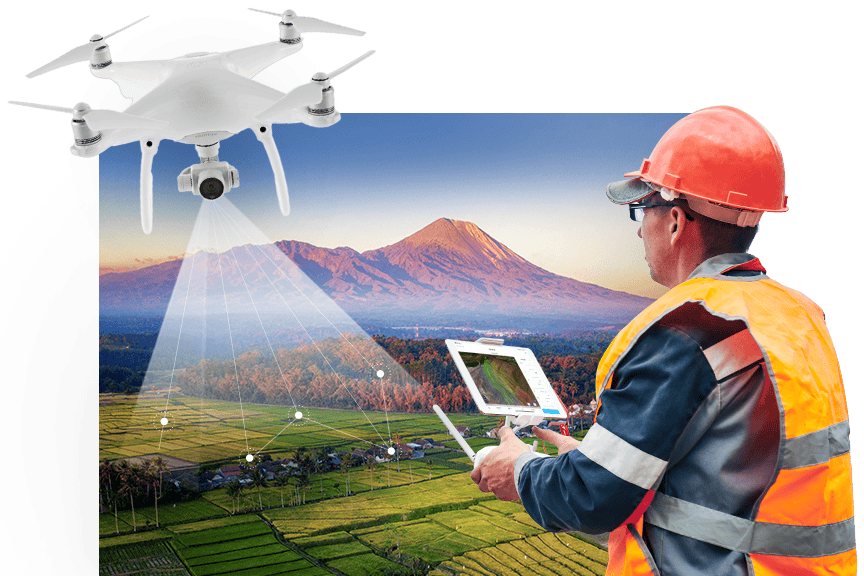
Here’s how it works: A drone flies a pre-planned path, capturing overlapping images of the terrain using an onboard camera or sensor. These images are then uploaded into drone mapping software, which uses photogrammetry or LiDAR processing to reconstruct the area in 2D or 3D. The result is a digital version of the site that can be measured, analyzed, and shared.
Common drone mapping outputs include:
- Orthomosaic maps. High-resolution, georeferenced 2D images stitched from multiple photos
- 3D models. Visual reconstructions of terrain or structures for inspection and planning
- Digital Elevation Models (DEMs). Surface elevation data used in surveying and engineering
- Point clouds. Dense sets of 3D coordinates representing physical surfaces
- 3D mesh reconstructions. Textured, detailed models built from image and geometry data
Credit: Esri
A Quick Note on the Word “Surveying”
→ Avoid using the word “surveyor” when marketing your drone mapping work.
Only a licensed surveyor is legally allowed to perform or advertise surveying services in most U.S. states. Even referring to your deliverables as “survey-grade” can raise red flags if you’re not properly licensed.
Some states, like North Carolina, have taken legal action against drone pilots simply for providing geo-referenced aerial images, claiming it qualifies as unlicensed surveying. To stay on the right side of the law, avoid making claims that could be interpreted as offering professional surveying unless you’re working with or under the direction of a licensed surveyor.
When in doubt, contact your state’s board of licensure for land surveyors to understand what’s allowed in your area.
Key Drone Mapping Terminology
The world of mapping by drones has a lot of acronyms and wonky phrases.
Here’s a glossary of key drone mapping terms organized alphabetically to help you get oriented:
Digital Elevation Model (DEM)
A drone 3D model of ground elevations created from drone imagery or LiDAR data. DEMs are used in construction planning, flood modeling, and environmental analysis.
Drone Mapping Software
Software platforms that process aerial imagery into maps and models. Popular options include DroneDeploy, Pix4Dmapper, Agisoft Metashape, and Propeller.
GCP (Ground Control Point)
A marked location on the ground with known GPS coordinates. GCPs are used to increase the geospatial accuracy of drone maps, especially in survey-grade projects.
Geotagging
The process of attaching location data—latitude, longitude, and altitude—to each image captured during a drone flight. Geotagged images are essential for accurate map generation.
Mapping Drone
A drone equipped with a high-resolution camera and GPS system, designed specifically for aerial mapping and data collection. Some mapping drones also include RTK or PPK capabilities.
Orthomosaic Map
A high-resolution 2D image created by combining many individual drone photos. Orthomosaics are corrected for perspective and scale, making them accurate for measurements.
Photogrammetry
The process of stitching together overlapping aerial images to create 2D maps and 3D models. It’s the core technology behind most drone mapping software.
Point Cloud
A collection of 3D data points generated from drone imagery or LiDAR. Each point represents a precise location in space, forming the foundation for 3D models and terrain analysis.
PPK (Post-Processed Kinematic)
PPK applies GPS corrections after the flight during data processing, using base station data collected separately. It achieves similar or sometimes better accuracy than RTK without requiring a continuous real-time connection during flight.
RTK (Real-Time Kinematic)
RTK is a GPS correction technique that provides centimeter-level positional accuracy during flight by connecting the drone to a nearby base station or network. This real-time correction helps ensure precise location data as images are captured.
Survey Grade
The term “survey grade” refers to mapping or positioning data that meets high accuracy standards commonly used in professional land surveying. However, use this term cautiously: as we noted just above, only licensed surveyors may legally provide or advertise “survey-grade” deliverables in many jurisdictions.
Best Mapping Drones [New for 2026]
A good mapping drone offers a balance of accuracy, flight time, payload flexibility, and GPS precision.
Here’s a quick overview of the drones listed here:
| Drone Model | Best Use Case | Price (Est.) | Max Flight Time | GPS Precision | Payload Compatibility |
|---|---|---|---|---|---|
| WingtraRAY | Repeatable accurate surveys | $30,000+ | Up to 59 minutes | PPK | High-res RGB, LiDAR, multispectral |
| DJI Matrice 350 RTK | Infrastructure, utilities, LiDAR | $12,000–$20,000+ | Up to 55 minutes | RTK | Zenmuse, LiDAR, thermal |
| eBee X | Surveying, agriculture | $15,000–$25,000+ | Up to 90 minutes | PPK | S.O.D.A., multispectral |
| AstroMax + Mapping Essentials | Construction, custom workflows | $18,000–$25,000+ | Approx. 40 minutes | RTK (if supported) | RGB, thermal, LiDAR (custom) |
Here is our full list of the top mapping drones on the market:
1. WingtraRAY
Type: Fixed-wing VTOL drone
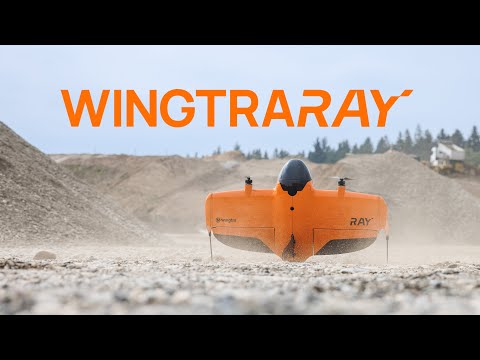
WingtraRAY is a professional fixed-wing VTOL drone built specifically for aerial surveying and mapping.
It is geared for teams that need more than flight time. The aircraft is part of a complete survey system that connects flight planning, high-precision sensors, GNSS positioning, accuracy validation, processing and data export.
This helps surveyors, engineers and GIS teams capture accurate data faster across sites of many sizes, then use it in their existing processing, CAD or GIS workflows with fewer manual steps.
- Flight time. Up to 59 minutes with RGB and multispectral payloads. Up to 45 minutes with LIDAR
- Payload capacity: Up to 2.75 pounds (1.25 kg)
- Camera and sensor options: MAP61, SURVEY61, INSPECT, Wingtra LIDAR, RedEdge-P
- Max coverage: Up to 1,360 acres (550 ha) in one flight with MAP61
- LIDAR coverage: Up to 1,140 acres (460 ha) in one flight with Wingtra LIDAR
- Accuracy: 0.1 ft (3 cm) RMS x, y, z with PPK
- Range: 6.2 miles (10 km) direct telemetry link
2. DJI Matrice 350 RTK
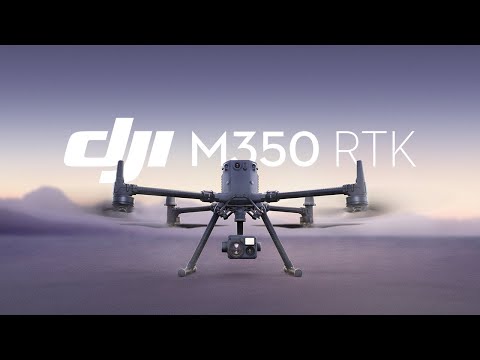
The DJI Matrice 350 RTK is a professional mapping drone built for industrial-grade applications.
With advanced RTK positioning, rugged weather resistance, and broad payload compatibility, it’s suited for everything from utility inspections to LiDAR-based mapping. It’s the go-to choice for many drone service providers and survey teams working in complex environments.
- Max flight time. Up to 55 minutes (with TB65 batteries)
- Max transmission range. 12.4 miles (20 km) with O3 Enterprise transmission
- GPS precision. RTK and GNSS supported
- Payload compatibility. Zenmuse L2, H20T, P1
Learn more about DJI Matrice 350 RTK.
3. eBee X

The eBee X is a lightweight fixed-wing mapping drone designed for professional surveying and agricultural monitoring.
It’s known for its endurance, accuracy, and portability—making it a strong choice for field teams who need to map large areas quickly with minimal setup. The eBee X is often used by engineering firms, agronomists, and GIS professionals.
- Max flight time: Up to 90 minutes (with endurance extension)
- Max coverage per flight: Up to 1,200 acres
- GPS precision: PPK enabled
- Payload compatibility. S.O.D.A. 3D, RedEdge-MX, Duet T
4. AstroMax (with Mapping Essentials package)

AstroMax is a high-end commercial mapping drone that pairs high-end build quality with flexible mapping capabilities.
When equipped with the Mapping Essentials package, it becomes a modular mapping drone capable of handling RGB, thermal, or LiDAR payloads. Its open payload architecture and custom workflows appeal to professionals working in construction and infrastructure mapping.
- Max flight time: Approx. 40 minutes (depending on payload)
- Max transmission range: 12.4 miles (20 km)
- GPS precision. RTK optional (if supported)
- Payload compatibility. RGB, thermal, LiDAR (via gimbal mount)
Best Drone Mapping Software [New for 2025]
A great drone mapping software platform balances ease of use, processing power, accuracy, and workflow compatibility.
Here’s a quick overview of the software covered here:
| Software | Best Use Case | Price Model | Cloud/Desktop | Notable Features |
|---|---|---|---|---|
| DroneDeploy | All-in-one mapping & analytics | Subscription | Cloud | Planning, processing, analytics |
| Pix4Dmapper | Survey-grade photogrammetry | Subscription/License | Desktop | Full processing control, RTK/PPK |
| DJI Terra | DJI workflow integration | Subscription/License | Desktop/Cloud* | 3D modeling, DJI optimization |
| Agisoft Metashape | Advanced modeling, offline use | License | Desktop | Detailed 2D/3D model creation |
| Pix4Dmatic | Large dataset processing | Subscription/License | Desktop | Fast, scalable, survey-grade |
| WebODM | Open-source mapping | Free | Desktop | Custom, extensible, no license |
| Propeller | Earthworks analytics | Subscription | Cloud | Cut/fill, volume analysis |
| ArcGIS Drone2Map | Esri GIS integration | Subscription/License | Desktop | Seamless with ArcGIS ecosystem |
| SimActive Correlator3D | Enterprise production | License | Desktop | High-speed, scalable processing |
*Some DJI Terra features available via local cloud network
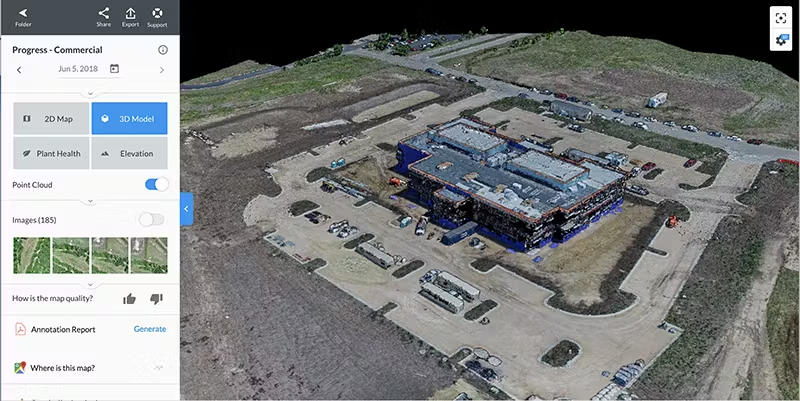
Credit: DroneDeploy
Here is our full list of the top mapping software for drones in 2025:
1. DroneDeploy
Best for: End-to-end workflows and teams needing cloud access
- Planning, mapping, analytics—all in one platform
- Automated reports and sharing tools
2. Pix4Dmapper
Best for: Surveyors and GIS pros demanding RAW data control
- Offline/desktop workflow
- Works with RTK/PPK data for maximum accuracy
3. DJI Terra
Best for: Users in the DJI ecosystem (only works on DJI drones)
- 2D maps, 3D models, and real-time outputs
- Cloud* and desktop deployment
4. Agisoft Metashape
Best for: Power users and academics
- Deep control, batch automation
- Works offline—ideal for sensitive data
Learn more about Agisoft Metashape
5. Pix4Dmatic
Best for: Large-scale projects, corridor mapping
- Scalable, survey-grade accuracy
- Works seamlessly with Pix4Dsurvey
6. WebODM
Best for: Technical teams wanting customizable workflows
- Custom, extensible workflows
- Runs locally for data privacy
7. Propeller
Best for: Contractors, earthmoving, and civil works
- Automated cut/fill and volume analysis
- Easy data sharing with clients
8. ArcGIS Drone2Map
Best for: Esri-based GIS teams
- Direct integration with the ArcGIS platform
- Robust analysis and visualization tools
Learn more about ArcGIS Drone2Map
9. SimActive Correlator3D
Best for: Enterprises needing maximum speed and scalability
- Handles massive imagery datasets
- Strong industry adoption, including for lidar
Learn more about SimActive Correlator3D
Getting Started with Drone Mapping
New to drone mapping?
The good news is you don’t need a degree in surveying or years of experience to get started.
With the right tools, some focused training, and a bit of practice, drone mapping is well within reach—even if you’re just now earning your Part 107 certification.
Whether you’re looking to build a side business or expand your existing drone services, this field offers a solid opportunity to grow your skills and serve high-demand industries.
What You Need to Learn
Before offering drone mapping services, it’s important to get proficient in these three things:
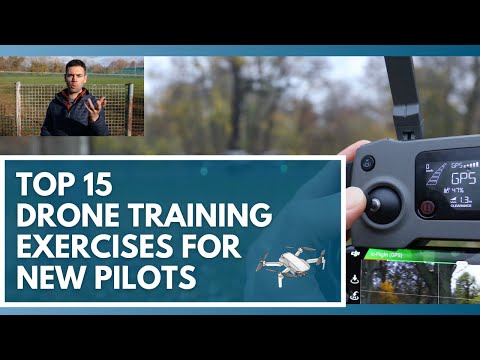
1. Basic Pilot Skills
Practice flying autonomously and manually. Learn how to set waypoints, manage battery life, and ensure safety during long, grid-based flights.
2. Aerial Data Capture
You’ll need to know how to plan flight paths with the right image overlap, choose the correct altitude for your desired resolution, and adjust patterns based on the terrain or structure you’re mapping.
3. Mapping Software
Photogrammetry is the process most drone mapping platforms use to turn images into maps. Familiarize yourself with how it works and start experimenting with user-friendly software like DroneDeploy or Pix4D.
Training and Certification
To legally operate a drone for commercial mapping in the U.S., you’ll need a Part 107 Remote Pilot Certificate from the FAA.

Need help with the Part 107 test?
Drone Pilot Ground School is our test prep course that helps drone pilots get ready for the Part 107 course. We’ve helped over 75,000 drone pilots get ready for the Part 107 course, and our students have a 99%+ success rate.
Learn more about Drone Pilot Ground School.
Start Small to Build Confidence
If you’re aiming to break into drone mapping professionally, begin with simpler jobs that let you sharpen your process and create a portfolio.
Ideal entry-level use cases include:
- Real estate mapping. Create 2D property overviews for listings and site planning.
- Roof inspections . Capture imagery for insurance reports and repair assessments.
- Construction site monitoring. Document progress and generate visuals for small residential or commercial builds.
Starting small helps you build real-world experience without the pressure of high-stakes projects. From there, you can scale your offerings and move into more advanced drone mapping services with confidence.
What Is Drone Mapping Used For?
Drone mapping is used across a wide range of industries to capture accurate, up-to-date visual data for decision-making, measurement, and documentation.
Here are the most industries using drone mapping today.
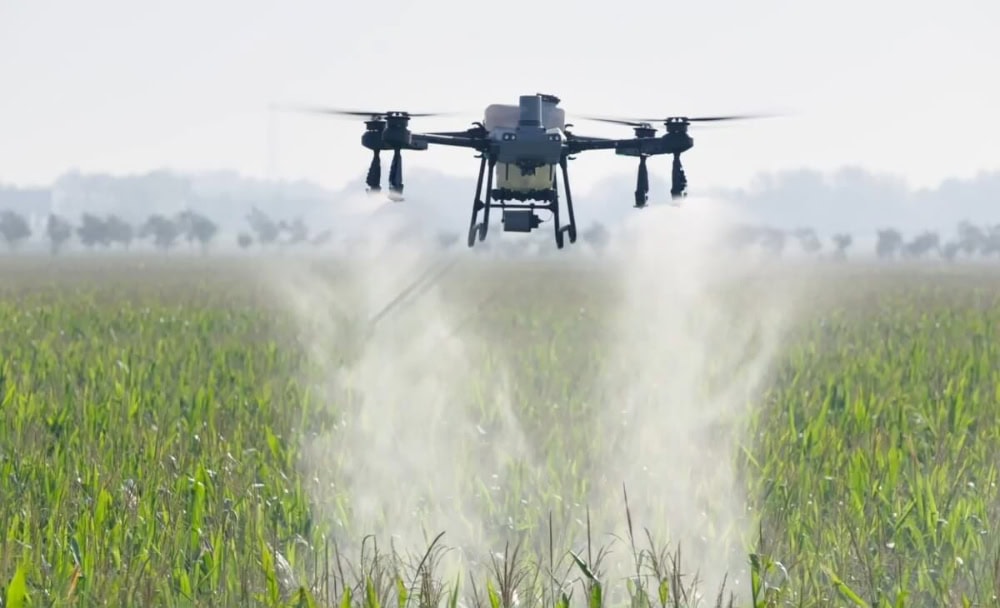
Agriculture
In agriculture, drone mapping helps monitor crop health using NDVI (Normalized Difference Vegetation Index) and other vegetation indexes. Farmers and agronomists can use these insights to manage irrigation, spot early signs of disease, and implement precision farming practices.
- Monitor crop health across large fields using NDVI or multispectral imagery
- Identify areas affected by pests, disease, or nutrient deficiencies
- Map drainage patterns to improve water management
- Plan and validate precision seeding or spraying efforts
Construction
Drone mapping is widely used in construction for site surveys, progress tracking, and stockpile volume calculations. It also supports cut-and-fill analysis by providing accurate elevation models, helping teams monitor earthworks and keep projects on schedule.
- Generate pre-construction site surveys for planning and permitting
- Track project progress week-to-week with updated orthomosaics
- Measure stockpile volumes for inventory and billing
- Perform cut-and-fill analysis to manage grading operations
Environmental Monitoring
Environmental agencies and consultants use drone mapping to track land changes, assess habitats, and support conservation initiatives. High-resolution aerial data supports accurate assessments with minimal environmental impact.
- Monitor wetland boundaries and vegetation health
- Track shoreline erosion and sediment transport
- Assess reforestation or habitat restoration progress
- Survey sensitive ecosystems without disturbing wildlife
Land Surveying
Surveyors use drones to capture high-resolution imagery for boundary mapping, site planning, and topographic (topo) mapping. Drone mapping drastically speeds up the process compared to traditional ground-based surveying, especially on large or uneven terrain.
- Generate topographic maps for civil engineering and planning
- Create base maps for subdivision layout and zoning
- Capture boundary data for land title and legal documents
- Produce high-resolution orthoimagery for property development
Mining
Mining operations rely on drone mapping for high-accuracy terrain models, stockpile volumetrics, and haul road inspections. It enables safer, more frequent data collection in environments that are often difficult or dangerous to access on foot.
- Map active pits and quarries for operations and planning
- Measure volume changes in stockpiles over time
- Monitor slope stability and erosion near highwalls
- Inspect haul roads to track wear and guide maintenance
Public Safety & Emergency Response
Drone mapping plays a critical role in disaster response and public safety efforts. It’s used for damage assessments after hurricanes or wildfires, rapid mapping of affected areas, and supporting search and rescue operations with real-time visual data.
- Map disaster zones quickly to assess damage and plan recovery
- Create real-time maps to support search and rescue missions
- Support situational awareness for wildfire and flood response
- Document post-disaster conditions for insurance and federal relief
Real Estate & Development
Drone mapping helps developers, architects, and real estate professionals better visualize land and plan projects. It provides detailed, up-to-date imagery that supports everything from marketing to site design.
- Create detailed site maps for planning new developments
- Capture up-to-date aerial imagery for real estate listings
- Generate 3D models for concept visualization and architecture
- Support permitting processes with accurate terrain data
Utilities & Infrastructure
Utility companies use drone mapping to inspect and monitor assets like power lines, substations, pipelines, and water treatment facilities. It improves safety while offering faster, more cost-effective inspections over large areas.
- Map transmission lines and towers for inspection and maintenance
- Survey substations and right-of-way corridors
- Monitor infrastructure after storms or other events
- Create 3D models of critical infrastructure for asset planning

How Do You Do Drone Mapping?
Whether you’re new to mapping or just starting to explore it as a service, understanding the workflow will help you plan flights more effectively and deliver professional results.
Here’s a step-by-step look at how drone mapping works, from planning your first mission to delivering client-ready outputs.
1. Plan the Mission
Every successful mapping project begins with detailed planning.
You’ll start by defining your project goals, including targets like required accuracy, coverage area, and the types of outputs needed.
The planning stage is also when you check airspace restrictions, obtain necessary permissions, and select the best drone mapping software or app for your workflow. Key flight parameters like altitude, overlap (usually 70% front and 60% side), image resolution, and grid or lawnmower patterns should be set in advance.
Confirm that your chosen drone, camera, and software are all compatible. Tools like DroneDeploy, Pix4Dcapture, or DJI Pilot make automating this process much easier.
2. Fly the Mission
Pre-flight checks are essential—inspect batteries, sensors, GPS status, and ensure optimal weather.
Most mapping missions use pre-programmed, autonomous flight plans to guarantee even coverage and consistent overlap.
While the drone executes the planned path, you’ll supervise from a mobile device or ground station, ready to intervene if conditions change or warnings appear.
3. Collect the Data
As the drone follows its programmed path, it captures high-resolution images tagged with GPS metadata.
Data quality is affected by lighting, overlap, camera angle, and sensor settings like shutter speed and ISO. It’s best to fly in stable, bright conditions and maintain consistent angles and altitude.
Following best practices during this stage ensures the data for your mapping outputs is robust.
4. Process the Data
After the flight, transfer your collected data—whether it’s images for photogrammetry, LiDAR point clouds, or multispectral/thermal imagery—into processing software suited to your mapping method. Photogrammetry software will stitch images into orthomosaics and 3D models.
LiDAR processing software converts raw scans to point clouds and terrain models. Multispectral and thermal platforms analyze sensor-specific data to create vegetation maps or heat signatures.
For projects demanding high spatial accuracy, incorporate Ground Control Points (GCPs), RTK, or PPK data as needed. Choose cloud or desktop solutions depending on your project’s size, sensitivity, and workflow.
5. Analyze the Outputs
With your models and maps completed, the next step is analysis.
Review your outputs for completeness and spatial accuracy before taking measurements, calculating volumes, or integrating the data into GIS or CAD systems.
Note: While some clients may want the drone pilot to perform basic analysis, others may just want the data and the map(s), and will then use experts like GIS specialists or engineers for more advanced or industry-specific interpretation.
6. Delivering and Reporting
The final phase is delivering clear, useful results.
Prepare maps, digital models, and documentation tailored to your client’s needs, and provide the deliverables via cloud platforms, web portals, or physical media.
As needed, offer recommendations for the next project phase or assist with integrating outputs into the client’s workflow to maximize the value of your mapping mission.
What Equipment Do You Need for Drone Mapping?
Choosing the right equipment depends on your goals. But even a basic setup can produce impressive results when paired with good planning and sound technique.
To get started with drone mapping you’ll need these essential tools:
- Mapping drone. At the core of every mapping workflow is a capable drone. Most pilots use a drone with a high-quality camera and GPS positioning. See our list of top mapping drones above as a starting place for your research.
- Optional features: RTK/PPK. If your work requires survey-grade results, look for drones with RTK (Real-Time Kinematic) or PPK (Post-Processed Kinematic) support. These systems correct GPS data to improve positional accuracy down to the centimeter level.
- Software. Mapping software is essential for planning flights, processing imagery, and generating maps or models. The right software lets you automate flight paths, process photogrammetry or LiDAR data, and analyze or share outputs. See our section on drone mapping software above for the top options on the market.
- Accessories. Depending on your needs, you may want to invest in accessories like Ground Control Points (GCPs) for enhanced georeferencing; GPS base stations (used with RTK drones); extra batteries for extended field time; and portable landing pads or cases for rough terrain.
Drone Mapping Jobs and Career Opportunities
Drone mapping jobs are on the rise as industries increasingly adopt aerial data for faster, safer, and more accurate decision-making.
Whether you’re a newly certified Part 107 pilot, a student exploring your options, or a professional looking to pivot into tech-driven fieldwork, drone mapping offers a range of career paths. Opportunities exist in both freelance and full-time roles, with demand growing in sectors like construction, agriculture, energy, and environmental science.
Common Roles in Drone Mapping
- Drone Pilot: Operates drones to capture geospatial imagery, often flying pre-planned autonomous missions and ensuring compliance with FAA regulations.
- Data Processor / Photogrammetrist: Processes imagery into maps and models using photogrammetry software. Responsible for stitching, georeferencing, and quality control.
- GIS Analyst: Analyzes spatial data, integrates drone outputs into GIS systems, and creates actionable maps and reports for stakeholders.
- Project Manager / Coordinator: Oversees mapping projects from start to finish, coordinating drone pilots, clients, deliverables, and deadlines to ensure smooth execution.
Industries Hiring for Drone Mapping
Many industries now rely on drone mapping to improve efficiency, accuracy, and safety. Common employers include:
- Construction: For site planning, tracking progress, and managing earthworks
- Agriculture: For crop monitoring, yield analysis, and precision farming
- Utilities and Infrastructure: For inspecting assets like power lines, substations, and pipelines
- Mining: For calculating volumes, tracking operations, and mapping terrain
- Surveying and Engineering Firms: For topographic mapping, boundary surveys, and CAD integration
- Environmental Services: For wetlands mapping, habitat analysis, and erosion tracking
- Government and Public Safety Agencies: For disaster response, infrastructure audits, and GIS database updates
Tips for Getting Started in Drone Mapping
If you’re looking to break into the drone mapping field, here are a few steps to help you stand out:
- Earn your FAA Part 107 certification—a legal requirement for any commercial drone work in the U.S.
- Build a portfolio using real-world projects or mock mapping missions. Practice with roof inspections, small construction sites, or even open fields.
- Get trained through a program like Drone Pilot Ground School, which provides a strong foundation in flight planning, mapping tools, and regulations.
- Find entry-level work by browsing platforms like DroneUp, Indeed, and LinkedIn. Local drone service providers are often open to partnering with skilled pilots on a project-by-project basis.
Like any specialized field, drone mapping can be competitive—but those who invest in training, gain hands-on experience, and stay up to date with new tools have a clear edge.
Drone Mapping Services
Drone mapping services are in high demand among companies that need accurate aerial data but don’t have in-house drone teams.
Businesses choose to outsource drone mapping services for several reasons: it’s faster, more cost-effective, and allows them to access specialized equipment or expertise without investing in their own drone program. Hiring a drone mapping service also ensures compliance with FAA regulations and delivers professional-grade outputs.
Typical drone mapping services include:
- Mission planning and regulatory compliance
- Data collection using mapping drones and ground control points
- Deliverables such as orthomosaics, 3D models, point clouds, and elevation maps
- Quick turnaround times and customized reports based on project requirements
- Transparent pricing based on area covered, deliverables needed, and processing complexity

Drone Mapping FAQ
Here are answers to some of the most commonly asked questions about drone mapping.
What is drone mapping?
Drone mapping is the process of capturing aerial images with a drone and using specialized software to turn those images into detailed maps and 3D models. These maps are used for everything from measuring land to documenting construction progress.
What is drone mapping used for?
Drone mapping is used across industries like construction, agriculture, mining, and surveying to create accurate site visuals, track changes over time, and collect spatial data for planning and analysis. For more examples, see the full section on what drone mapping is used for.
How do you do drone mapping?
Drone mapping involves planning a flight, capturing overlapping aerial images, processing those images with drone mapping software, and then analyzing the resulting outputs. The process relies on both skilled piloting and the right combination of hardware and software. See the drone mapping workflow section for a full breakdown.
What is the best drone mapping software?
The best drone mapping software depends on your needs. DroneDeploy is great for all-in-one workflows, Pix4Dmapper is popular with surveyors, and Agisoft Metashape offers deep customization. For a full comparison, visit our drone mapping software guide.
Who offers the best drone mapping analytics?
Platforms like Propeller, AirWorks, and DroneDeploy offer some of the best drone mapping analytics, especially for construction and large-scale survey projects. The best option will depend on your specific industry and data needs.
What are the benefits of drone mapping?
Drone mapping helps teams collect accurate site data quickly, safely, and cost-effectively. It reduces the need for ground crews, speeds up project timelines, and provides visual documentation that can be shared across teams or with clients.
What equipment do you need for drone mapping?
At a minimum, you’ll need a mapping drone with a high-resolution camera and GPS. Many professionals also use RTK/PPK systems, ground control points (GCPs), and mapping software to ensure accuracy. See the full section on equipment for drone mapping for more details.
Can I use a drone for surveying?
Yes, drones can be used for surveying, especially when paired with RTK/PPK and proper ground control. However, depending on your state or country, a licensed land surveyor may be required to sign off on deliverables for legal or contractual purposes.
Is drone mapping accurate?
When done correctly, drone mapping can achieve centimeter-level accuracy—especially when using RTK/PPK systems and GCPs. The final accuracy depends on your flight planning, equipment, and post-processing methods.
Do I need a license to do drone mapping?
Yes. In the U.S., anyone performing drone mapping for commercial purposes must hold an FAA Part 107 Remote Pilot Certificate. You’ll need to pass a written test and follow FAA regulations for safe and legal operations.
Want to take a deeper dive into the world of mapping by drone?
Make sure to check out our in-person drone mapping workshop and online drone mapping course.