New Firmware Update Adds Panorama Skill, Other New Features to Skydio 2+

BY Zacc Dukowitz
18 January 2023

Skydio just released a major firmware update for its Skydio 2+.

One of the biggest new features that comes with the update is the addition of the Panorama skill, a flight skill that lets you take horizontal, vertical, and spherical panoramic shots. The update also provides new features for the Scout skill, the Keyframe skill, as well as several other upgrades.

Watch the video below for an overview, and keep reading to get all the details.

Enterprise Release Notes: Skydio 2/2+ (Jan 2023)

What Are Skydio Flight Skills?

Flight skills are autonomous flying modes made to let users capture specific shots or have their drone fly in a specific kind of way.

The first flight skill Skydio released was Keyframe. It was unveiled along with the Skydio 2+ just about one year at CES 2023.

Keyframe lets users set a specific flight path defined by key shots, or frames, and then the drone flies that path autonomously to create a smooth video of it. Real estate marketing is one of the most popular use cases for Keyframe, but it’s also good for general aerial cinematography.

Introducing Skydio 2+ with KeyFrame

The second flight skill Skydio released was Scout, which came out in September of last year.

Scout lets users establish a tether between the drone and either its controller or a beacon, allowing it to follow a subject autonomously.

With this firmware update, Skydio has now added a third flight skill—Panorama—along with providing new features for both the Keyframe and Scout skills.

New Panorama Skill

The Panorama skill is almost exactly what it sounds like—it’s a new skill that lets you take horizontal, vertical, and spherical panoramic photos.

panorama-skydio-2+

Using the Panorama skill, you can take horizontal shots that let you capture large areas of interest in a single image. These could be useful for work in real estate and construction, allowing a large area of land or construction project to be seen in one photo.

You can also use the Panorama skill to capture sweeping vertical shots, getting a lot more into an image to capture scenic promotional content or shots for social media.

But the last option that comes with Panorama—spherical, or 360° images—stands out as a fairly unique offering. Spherical shots let you take a true 360° image, collecting data that can be viewed in a 3rd party interactive viewer (if you like) so that you can click around to explore the fully stitched 360° image. Just one thing to note about these images—it’s important to allow the stitching to complete before you power off your drone.

Keyframe Skill Updates

The firmware update also brings two new upgrades to the Keyframe skill—the ability to adjust the keyframe roll and increased keyframe accuracy.
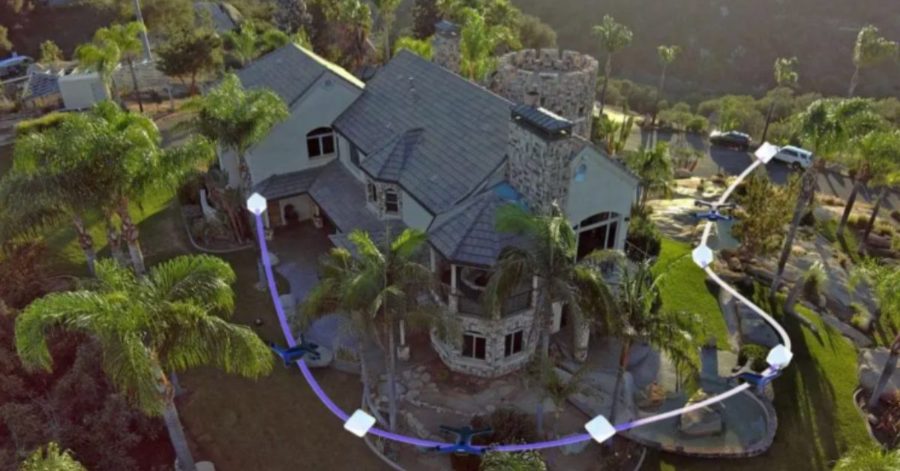
skydio-keyframe-challenge
An illustration of the Keyframe skill allowing the drone to follow a flight path based on key shots

Adjusting Keyframe Roll

With this update, you can now adjust the camera roll along its autonomous flight path while flying in Keyframe.

This enhanced gimbal control comes in three different styles:

  • Playback style—Dynamic mode. Simulate automatic dynamic shots by having the drone automatically roll the gimbal angle during flight.
  • Playback style—Recorded. Lets you set the gimbal angle at keyframe points so that the gimbal roll smoothly transitions between these points.
  • Playback style—Free look. Lets you manually control the gimbal roll with the right wheel or paddle.

Increased Keyframe Accuracy

The update also improves the drone’s locational accuracy while in Keyframe, significantly reducing drift in the Keyframe skill.

This skill is useful both for replaying—or re-flying—the same flight paths in Keyframe, so that your path stays much closer to the original over time. It’s also useful for longer distances, helping the drone stay on the path you originally intended while in Keyframe.

A note about this new locational accuracy in Keyframe: it’s important to launch the drone from the same position and orientation when performing a Keyframe across multiple flight paths.

Scout Skill Updates

The Scout skill provides GPS-guided overwatch of either the controller or the Skydio beacon, letting the drone trail a subject at set distance.

There are two upgrades to the Scout skill in the new firmware upgrade—the ability to add an AR marker over the tracked subject and the addition of two options for how the drone flies relative to the subject.

AR Marker for the Tracked Subject

The addition of an AR marker over the tracked subject allows you to see the subject on your screen.

It also allows the drone operator to orient themselves to the tracked GPS while in flight a lot more easily.

Two New Positioning Behavior Options

Here are the two options you now have for how the drone positions itself relative to the subject while in Scout:

  • Fixed. This setting keeps your drone on a tether, but the drone will not automatically rotate if the subject changes direction. Instead, the drone will continue to track the subject while its perspective remains fixed until changed by the operator.
  • Relative. This setting allows the drone to reposition itself around the tracked subject to match changes in the subject’s direction, adjusting position and rotation to keep the tether and the overwatch perspective.
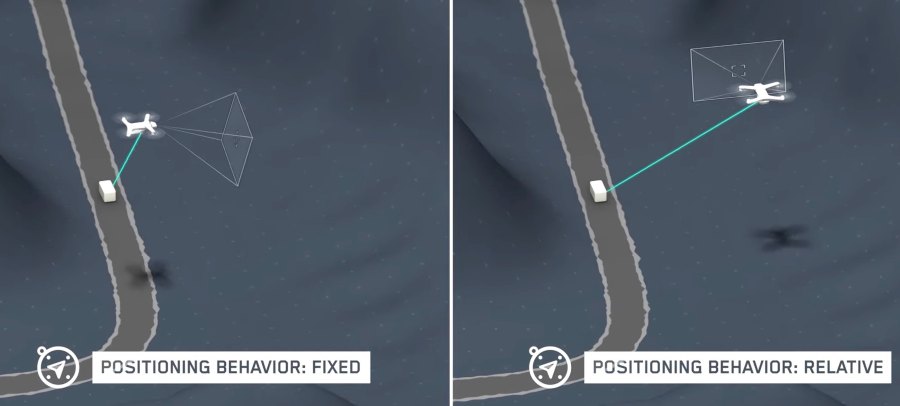
scout-firmware-update

Other updates

In addition to the skill updates listed above, here are the other updates that come with the new firmware:

  • Low battery auto return. This allows the drone to return home automatically when its battery is low. Note: a home point must be set to use this feature.
  • Search by location or address. Allows you to find a location either with latitude and longitude or with a physical address. Note: only available for the enterprise controller.
  • Cloud updates. You can now share media from a flight, delete media, and store your drone’s battery data all in the cloud.
  • A new tutorial section. Tutorials on how to use your Skydio 2+ can now be found in the controller.
  • Upward capture for 3D scans. You can now enable upward capture so the drone automatically adjusts the camera gimbal pitch to look up when it detects that the height of the drone is below the scanned surface when collecting data for 3D models.
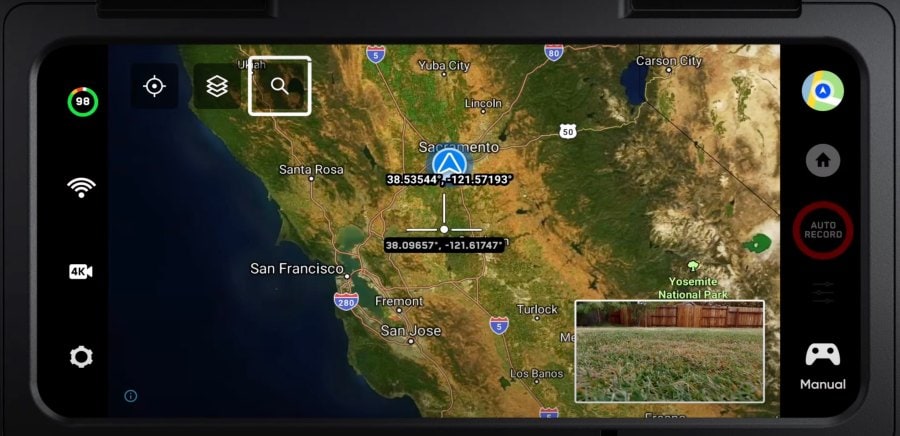
search-by-address-skydio
Search by address or location from your controller

Learn more about Skydio’s new firmware update on the Skydio website.

Join a global community of

100,000+

drone enthusiasts.

Subscribe

Drone Pilot's Guide to DJI Mini 4 Pro

  • Navigate the DJI Fly app and flight modes with ease
  • Adjust camera and safety settings for better control
  • Understand intelligent flight features and how to use them
  • Avoid common beginner mistakes
  • Get the most out of your drone—without the guesswork

Drone Pilot's Guide to DJI Air 3S

  • Navigate the DJI Fly app and flight modes with ease
  • Adjust camera and safety settings for better control
  • Understand intelligent flight features and how to use them
  • Avoid common beginner mistakes
  • Get the most out of your drone—without the guesswork

Hands-On Flight Training

$295

400+ 5-Star Reviews

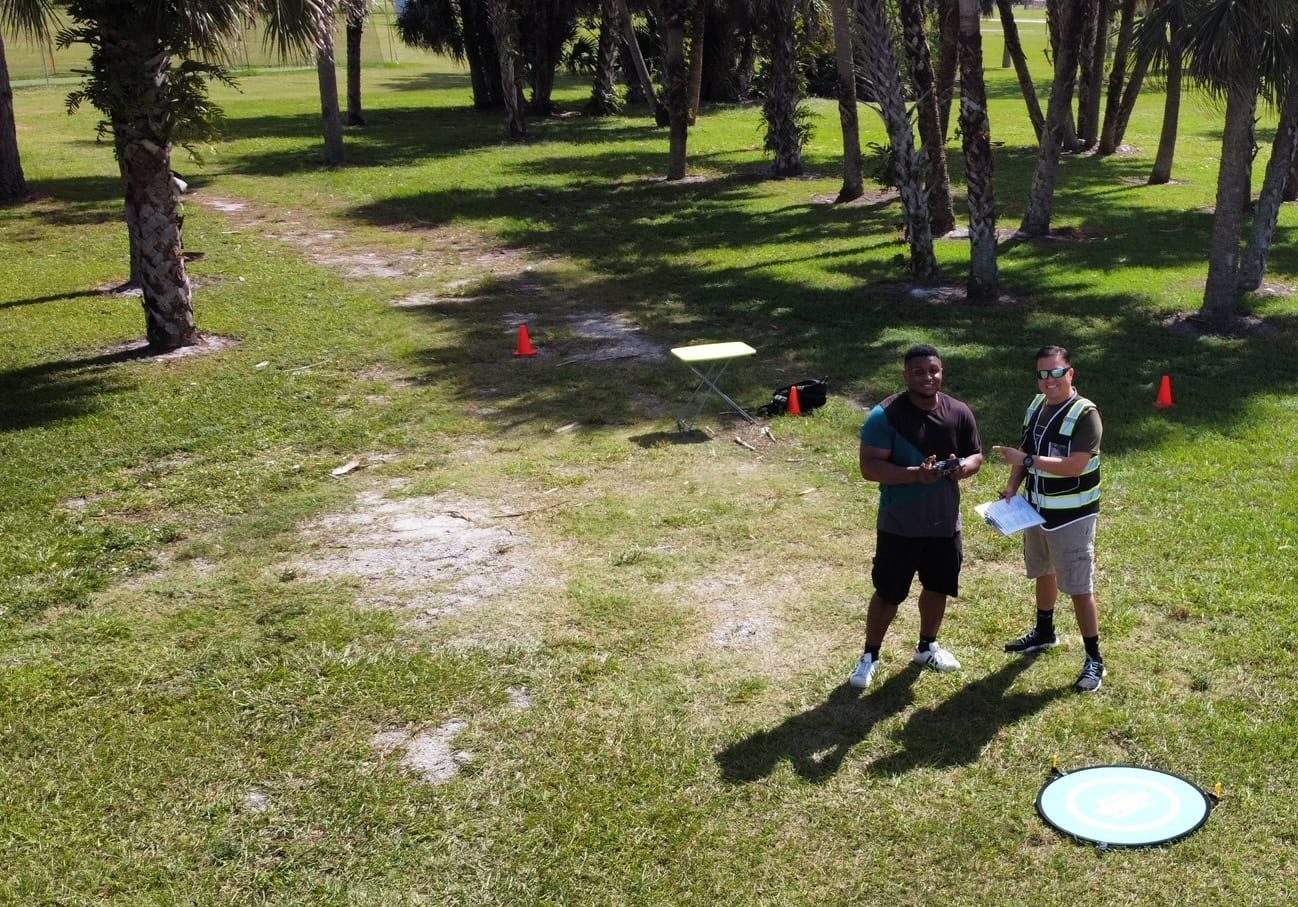
  • Team up with a knowledgeable, friendly instructor at a convenient outdoor spot — like a park or athletic field
  • Fly a top-rated drone provided for you, or bring your own to get personalized guidance
  • Spend most of your time in the air with hands-on practice — learning about composition, camera angles and cinematic motion
  • Explore the DJI Fly app and learn how to use camera settings like ISO, shutter speed and aperture
  • Unlock the power of Intelligent Flight Modes to fly smoother, smarter, and with less stress
  • Get access to our Aerial Photo & Video online course with additional exercises and pro-level editing workflows – using Snapseed, Photopea, Adobe Lightroom, DJI LightCut, and Premiere Pro

Aerial Photo & Video for Drone Pilots

$179

3,500+ 5-Star Reviews

  • How to dial in the right camera settings like ISO, shutter speed, and aperture
  • The best angles & altitudes for different types of shots (real estate, landscapes, cityscapes, and more)
  • The secret to cinematic drone motion that makes your footage feel like a Hollywood movie
  • How to enhance colors, remove distractions, and sharpen details – even in tricky lighting
  • Pro-level editing workflows – whether you’re using Lightroom, free tools, or mobile apps

The Recreational UAS Safety Test

Free

150+ 5-Star Reviews

  • Required for U.S. recreational flyers of drones
  • Launched June 2021 by the FAA
  • Takes about 30 minutes to complete
  • No prior drone knowledge needed
  • Test allows unlimited attempts to pass

Drone Mapping Essentials Workshop

$799

3,500+ 5-Star Reviews

  • Expert instruction from expert drone pilots with over 100 hours of flying experience
  • Hands-on training of live data capture and how to process deliverables for your clients
  • Peer-to-peer networking with other professional drone pilots in the mapping industry
  • Free access to the online course, Drone Mapping Essentials

Flight Skills for Drone Pilots

$99

75+ 5-Star Reviews

  • 16 engaging video lectures with key takeaways
  • Action items with concrete steps so you put into practice what you learn
  • Pre-flight checklists to help you plan your flights
  • Resource links to websites, products and software for further learning and discovery

Drone Business & Mapping Bundle

$617 $397

3,500+ 5-Star Reviews

  • Drone Pilot Ground School
    1. 1:1 support with a Part 107 exam success coach
    2. Study 100% online at your own pace
    3. Unlimited practice exams with 400+ real FAA test questions
  • Drone Mapping Essentials
    1. 100+ instructional videos focused on real-world application with high-quality videos
    2. Downloadable resources like data capture checklists to utilize in your missions
    3. Monthly live instruction with course instructor, Dylan Gorman, to go deeper on topics where you need more clarification
  • The Drone Business Blueprint
    1. Expert instruction from industry veteran, Eno Umoh, who brings real-world experience in building successful drone businesses.
    2. 14 Comprehensive modules covering everything from business setup to marketing strategies
    3. 30 Downloadable resources to apply your learning immediately

Hands-On Flight Training

$295

400+ 5-Star Reviews

  • 45-60 minutes of hands-on flying time to master orientation and flight maneuvers tailored to your skill level
  • Learn how to handle obstacles such as lost GPS, low battery charge or emergencies
  • Practice flying under various intelligent flight modes
  • Ask questions about regulations, software, flight operations management, and more

The Drone Business Blueprint

$119

3,500+ 5-Star Reviews

  • Expert instruction from industry veteran, Eno Umoh, who brings real-world experience in building successful drone businesses.
  • 14 Comprehensive modules covering everything from business setup to marketing strategies
  • 30 Downloadable resources to apply your learning immediately
  • AI tools and techniques to boost productivity and streamline your operations

Commercial Drone Business Bundle

$418 $334

4,000+ 5-Star Reviews

  • Drone Pilot Ground School
    1. 1:1 support with a Part 107 exam success coach
    2. Study 100% online at your own pace
    3. Unlimited practice exams with 400+ real FAA test questions
  • The Drone Business Blueprint
    1. Expert instruction from industry veteran, Eno Umoh, who brings real-world experience in building successful drone businesses.
    2. 14 Comprehensive modules covering everything from business setup to marketing strategies
    3. 30 Downloadable resources to apply your learning immediately

Drone Mapping Essentials

$199

3,500+ 5-Star Reviews

  • 100+ instructional videos focused on real-world application with high-quality videos
  • Downloadable resources like data capture checklists to utilize in your missions
  • Quizzes to test your knowledge so you can succeed in the field
  • Monthly live instruction with course instructor, Dylan Gorman, to go deeper on topics where you need more clarification

Drone Pilot Pro Bundle

$713 $499

3,500+ 5-Star Reviews

  • Drone Pilot Ground School
    1. 1:1 support with a Part 107 exam success coach
    2. Study 100% online at your own pace
    3. Unlimited practice exams with 400+ real FAA test questions
  • Drone Pilot Skill Builder
    1. 16 engaging video lectures with key takeaways
    2. Action items with concrete steps so you put into practice what you learn
  • Hands-On Flight Training
    1. 45-60 minutes of hands-on flying time to master orientation and flight maneuvers tailored to your skill level

Drone Pilot Ground School

$299

4,000+ 5-Star Reviews

  • 1:1 support with a Part 107 exam success coach
  • Study 100% online at your own pace
  • Unlimited practice exams with 400+ real FAA test questions
  • Personalized study plans, virtual flashcards, and 12-page cram sheet
  • Weekly webinars on acing the Part 107 exam and monthly webinars to elevate your journey post-certification