Skydio Launches Skydio 3D Scan for Commercial 3D Mapping

BY Zacc Dukowitz
10 June 2021

Skydio recently launched Skydio 3D Scan, a new 3D mapping software, with a big event at the US Space and Rocket Center in Huntsville, Alabama.

This video does a good job summing up the benefits of the new software, highlighting how it can be used in harmony with Skydio’s well-known autonomous flight to help commercial clients quickly create 3D models:

Introducing Skydio 3D Scan™

The new software is made for both professional inspectors and first responders, allowing them to quickly—and autonomously—create 3D models of critical infrastructure, accident scenes, or whatever they might need to model for the work at hand.

The software is available right now for the Skydio 2 at $2,999, and will be available soon for the Skydio X2 series.

For inspectors, Skydio 3D Scan will help them collect precise visual data so they can have detailed three-dimensional representations of the assets they’re inspecting.

These assets could be cell phone towers, semiconductor facilities, or dams, as shown in the video below:

Skydio 3D Scan™ | Semi-conductor Facility

For first responders, Skydio 3D Scan will help them to map the sites of major accidents in order to create a thorough record that can be investigated later to determine the cause of the event.

Such accidents could be the collapse of a highway, a fire, or a car accident, as highlighted in this 3D model:

What Makes Skydio 3D Scan Different?

One of the biggest differentiators of Skydio’s new software from other 3D modeling software is how it captures data.

Building a 3D model with drone photogrammetry requires a drone pilot to capture a certain amount of photographs to ensure a proper level of accuracy in the model. Doing this means the pilot has to fly specific flight paths to make sure they’re getting all the data they need.

Currently, a drone pilot can use basic automation to have the drone fly a 2D flight pattern, like the one shown below.
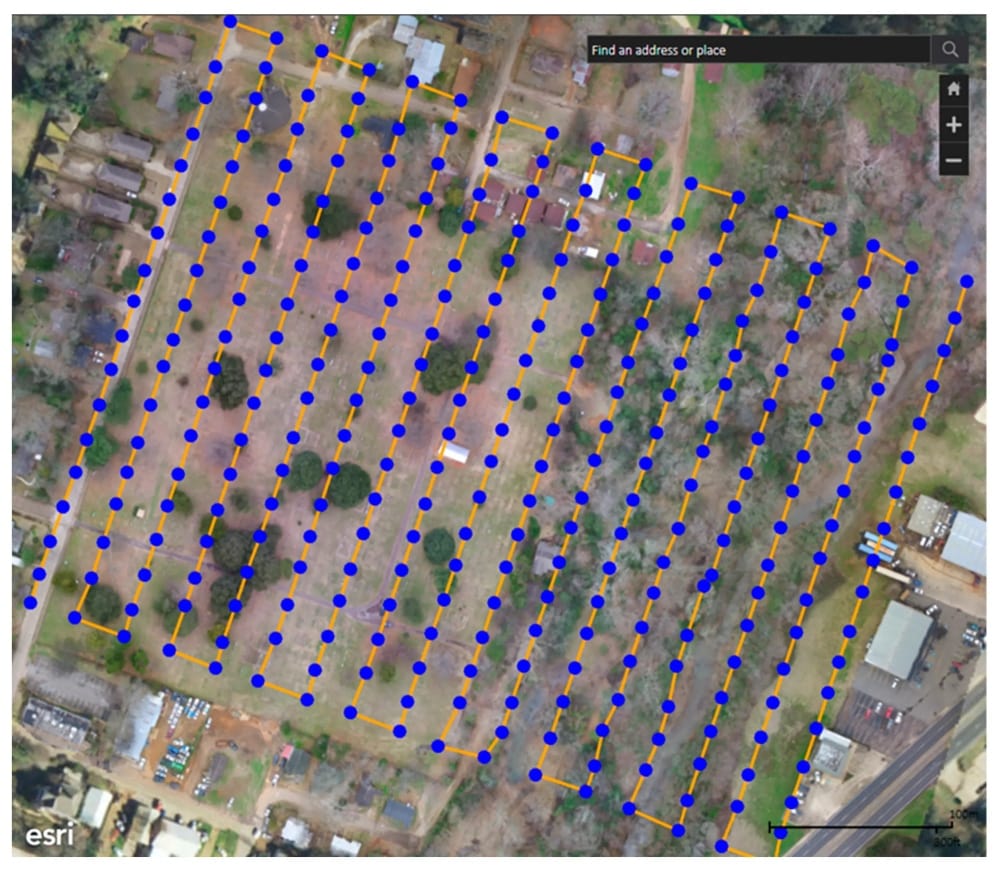
skydio-2d-flight-pattern
Photo credit: Skydio

Alternately, if the pilot wants to create a more realistic 3D model, they can fly manually around the structure they want to model and collect more data points to create a more complex, nuanced model.

But Skydio’s new software offers a third solution—3D automation.

Using Skydio’s AI-enable autonomy, the Skydio 2 can fly an automated flight path in three dimensions to capture all the images needed to produce a model of a complex structure.
skydio-3d-data-capture
Photo credit: Skydio

These images can then be used to create an incredibly detailed digital twin—that is, a digital replica of the real thing being mapped.

This 3D autonomy for data capture means that users can ““fully automate the entire data capture process”—meaning, you don’t have to fly the drone to collect the data you need to make a highly detailed 3D scan.

Instead, you can tell the drone what you want to model, and then it will fly the path needed to get the appropriate data while building you a 3D map in real time.

skydio-3d-scan-example
Photo credit: Skydio

The value here is scalability for commercial drone programs, both for professional inspectors and first responders.

By making a plug-and-play solution, Skydio is allowing clients who need to create 3D models regularly a means to do so without the need to invest heavily in training a team of professional drone pilots.

That’s the pitch, at least—whether companies can rely solely on Skydio’s drones for all their inspection needs remains to be seen.

But the ability to create 3D models autonomously will certainly make it an attractive option for many commercial users, and may help make it one of the most sought after tools in an inspector’s toolkit.

Skydio 3D Scan Features

Here are some standout features for Skydio’s new software:

  • Autonomous 3D scans—automatically create 3D scans of any structure, even complex ones.
  • Automated flight paths—Skydio drone plans the shots, you choose the resolution.
  • Highly precise—3D scans with precision of up to .65mm/pixel.
  • Use 3D model while still on site—most 3D modeling software requires several hours to process, but Skydio’s 3D scans can be reviewed “instantly on site.”
  • Compatibility—Skydio 3D Scan is compatible with several other types of 3D modeling software, including software from Pix4D, Bentley, DroneDeploy, and RealityCapture.
  • Augmented reality—full coverage of the object being modeled can be verified in real time using augmented reality.

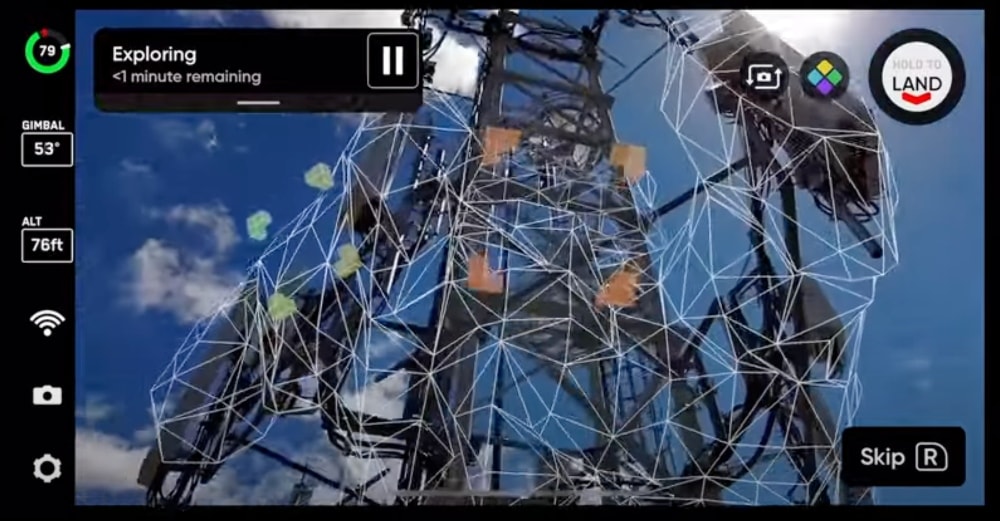
Here’s an image highlighting the augmented reality feature in Skydio 3D Scan, which can help ensure full coverage when creating 3D scans of an object:

skydio-augmented-reality
Photo credit: Skydio

3D Models Made with Skydio 3D Scan

Want to see some more 3D models made with Skydio’s new software?

Here you go:

Mock helicopter crash

Corsair jet

Lunar lander

Excited about the launch of Skydio 3D Scan? Share your thoughts in this thread on the UAV Coach community forum.

Join a global community of

100,000+

drone enthusiasts.

Subscribe

Drone Pilot's Guide to DJI Mini 4 Pro

  • Navigate the DJI Fly app and flight modes with ease
  • Adjust camera and safety settings for better control
  • Understand intelligent flight features and how to use them
  • Avoid common beginner mistakes
  • Get the most out of your drone—without the guesswork

Drone Pilot's Guide to DJI Air 3S

  • Navigate the DJI Fly app and flight modes with ease
  • Adjust camera and safety settings for better control
  • Understand intelligent flight features and how to use them
  • Avoid common beginner mistakes
  • Get the most out of your drone—without the guesswork

Hands-On Flight Training

$295

400+ 5-Star Reviews

  • Team up with a knowledgeable, friendly instructor at a convenient outdoor spot — like a park or athletic field
  • Fly a top-rated drone provided for you, or bring your own to get personalized guidance
  • Spend most of your time in the air with hands-on practice — learning about composition, camera angles and cinematic motion
  • Explore the DJI Fly app and learn how to use camera settings like ISO, shutter speed and aperture
  • Unlock the power of Intelligent Flight Modes to fly smoother, smarter, and with less stress
  • Get access to our Aerial Photo & Video online course with additional exercises and pro-level editing workflows – using Snapseed, Photopea, Adobe Lightroom, DJI LightCut, and Premiere Pro

Aerial Photo & Video for Drone Pilots

$179

3,500+ 5-Star Reviews

  • How to dial in the right camera settings like ISO, shutter speed, and aperture
  • The best angles & altitudes for different types of shots (real estate, landscapes, cityscapes, and more)
  • The secret to cinematic drone motion that makes your footage feel like a Hollywood movie
  • How to enhance colors, remove distractions, and sharpen details – even in tricky lighting
  • Pro-level editing workflows – whether you’re using Lightroom, free tools, or mobile apps

The Recreational UAS Safety Test

Free

150+ 5-Star Reviews

  • Required for U.S. recreational flyers of drones
  • Launched June 2021 by the FAA
  • Takes about 30 minutes to complete
  • No prior drone knowledge needed
  • Test allows unlimited attempts to pass

Drone Mapping Essentials Workshop

$799

3,500+ 5-Star Reviews

  • Expert instruction from expert drone pilots with over 100 hours of flying experience
  • Hands-on training of live data capture and how to process deliverables for your clients
  • Peer-to-peer networking with other professional drone pilots in the mapping industry
  • Free access to the online course, Drone Mapping Essentials

Flight Skills for Drone Pilots

$99

75+ 5-Star Reviews

  • 16 engaging video lectures with key takeaways
  • Action items with concrete steps so you put into practice what you learn
  • Pre-flight checklists to help you plan your flights
  • Resource links to websites, products and software for further learning and discovery

Drone Business & Mapping Bundle

$617 $397

3,500+ 5-Star Reviews

  • Drone Pilot Ground School
    1. 1:1 support with a Part 107 exam success coach
    2. Study 100% online at your own pace
    3. Unlimited practice exams with 400+ real FAA test questions
  • Drone Mapping Essentials
    1. 100+ instructional videos focused on real-world application with high-quality videos
    2. Downloadable resources like data capture checklists to utilize in your missions
    3. Monthly live instruction with course instructor, Dylan Gorman, to go deeper on topics where you need more clarification
  • The Drone Business Blueprint
    1. Expert instruction from industry veteran, Eno Umoh, who brings real-world experience in building successful drone businesses.
    2. 14 Comprehensive modules covering everything from business setup to marketing strategies
    3. 30 Downloadable resources to apply your learning immediately

Hands-On Flight Training

$295

400+ 5-Star Reviews

  • 45-60 minutes of hands-on flying time to master orientation and flight maneuvers tailored to your skill level
  • Learn how to handle obstacles such as lost GPS, low battery charge or emergencies
  • Practice flying under various intelligent flight modes
  • Ask questions about regulations, software, flight operations management, and more

The Drone Business Blueprint

$119

3,500+ 5-Star Reviews

  • Expert instruction from industry veteran, Eno Umoh, who brings real-world experience in building successful drone businesses.
  • 14 Comprehensive modules covering everything from business setup to marketing strategies
  • 30 Downloadable resources to apply your learning immediately
  • AI tools and techniques to boost productivity and streamline your operations

Commercial Drone Business Bundle

$418 $334

4,000+ 5-Star Reviews

  • Drone Pilot Ground School
    1. 1:1 support with a Part 107 exam success coach
    2. Study 100% online at your own pace
    3. Unlimited practice exams with 400+ real FAA test questions
  • The Drone Business Blueprint
    1. Expert instruction from industry veteran, Eno Umoh, who brings real-world experience in building successful drone businesses.
    2. 14 Comprehensive modules covering everything from business setup to marketing strategies
    3. 30 Downloadable resources to apply your learning immediately

Drone Mapping Essentials

$199

3,500+ 5-Star Reviews

  • 100+ instructional videos focused on real-world application with high-quality videos
  • Downloadable resources like data capture checklists to utilize in your missions
  • Quizzes to test your knowledge so you can succeed in the field
  • Monthly live instruction with course instructor, Dylan Gorman, to go deeper on topics where you need more clarification

Drone Pilot Pro Bundle

$713 $499

3,500+ 5-Star Reviews

  • Drone Pilot Ground School
    1. 1:1 support with a Part 107 exam success coach
    2. Study 100% online at your own pace
    3. Unlimited practice exams with 400+ real FAA test questions
  • Drone Pilot Skill Builder
    1. 16 engaging video lectures with key takeaways
    2. Action items with concrete steps so you put into practice what you learn
  • Hands-On Flight Training
    1. 45-60 minutes of hands-on flying time to master orientation and flight maneuvers tailored to your skill level

Drone Pilot Ground School

$299

4,000+ 5-Star Reviews

  • 1:1 support with a Part 107 exam success coach
  • Study 100% online at your own pace
  • Unlimited practice exams with 400+ real FAA test questions
  • Personalized study plans, virtual flashcards, and 12-page cram sheet
  • Weekly webinars on acing the Part 107 exam and monthly webinars to elevate your journey post-certification