How to Contact DJI Customer Support and What to Do if Your DJI Drone Gets Damaged
BY Alan Perlman
29 April 2019As of January 13, 2025 almost all DJI drones are no longer locked. See our DJI FlySafe guide for everything you need to know.
DJI Customer Support makes it easy for DJI drone owners to contact them about any issues. Fast response times and effective solutions make working with DJI Customer Support one of the many benefits of owning DJI products.
In this article, we’ll review the different ways to contact DJI Customer Support and what to do if your DJI drone gets damaged. Here are links to each section:
How to Contact DJI Customer Support
DJI Customer Support has made it incredibly easy for DJI customers in need of support to reach them by offering communication and contact through multiple channels.
Whether you’d like to share the details of your issue with someone directly over the phone or you prefer the convenience of an online live chat, DJI Customer Support provides many options to get in touch including:
- Livechat
- Phone
- YouTube
- Forum
In the next sections, we’ll provide step-by-step instructions on how to contact DJI Support through each of these channels.
Livechat: How to chat live online with DJI Customer Support
You can speak with DJI customer support staff about a specific product using the livechat on the official DJI website following these steps.
1. Visit https://www.dji.com/support/product. Choose the product for which you need support.
2. You’ll be taken to a product-specific support page with answers to FAQ’s and video tutorials for common issues. Below the video tutorials, near the bottom of the page, you’ll see additional options for contacting DJI. Click on ‘Online Support.’
 3. You’ll be prompted to select a category for your issue and again shown answers to FAQs. To proceed to the livechat, click on ‘Still Need Help? Contact Online Support.’
4. Enter your name and email address. Then click on ‘Chat’ to be connected to DJI Customer Support staff.
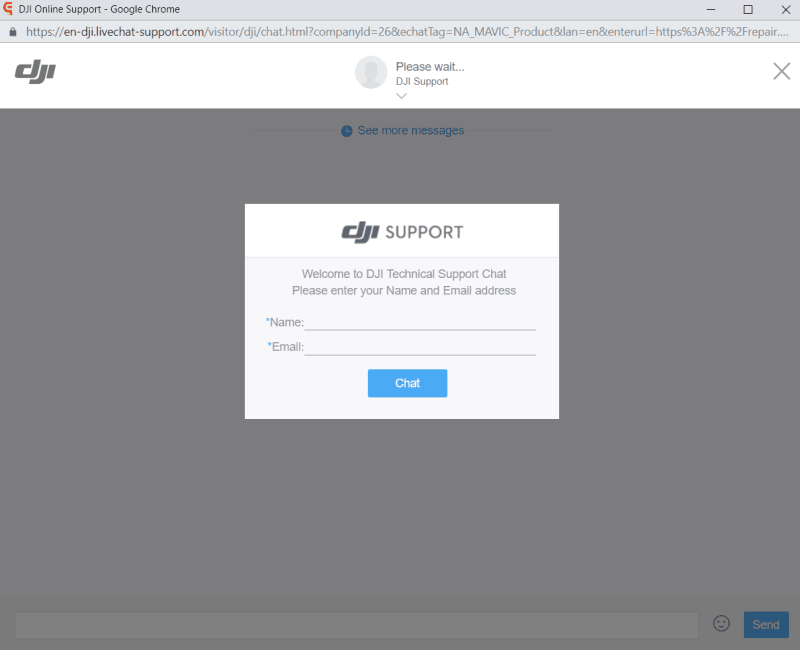
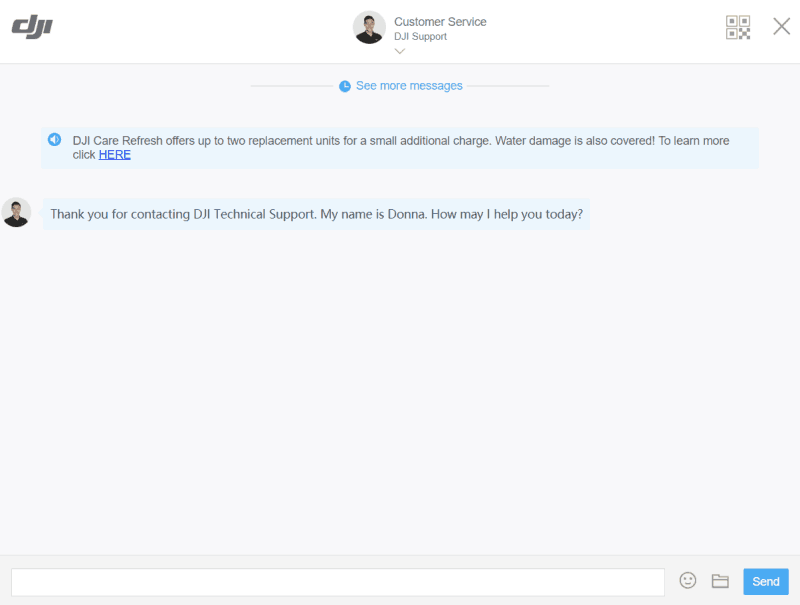
5. You can now discuss your issue with DJI Support staff.
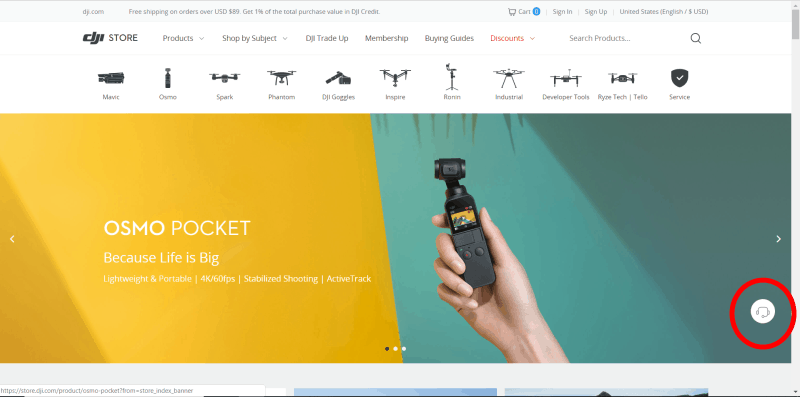
An alternate method for accessing the livechat is to click on the Headphone icon in DJI Store. You’ll find it in the bottom right corner of the screen.
Don’t have a pc or laptop with you right now? If it’s an urgent case, you can still reach support through the DJI GO 4 app.
Email: How to Email DJI Customer Support
You can reach DJI Customer Support via Email, and they will usually get back to you within 24 hours.
- For general problems: Support@dji.com
- For Flysafe problems, such as unlocking no-fly zones: Flysafe@dji.com
The DJI Customer Support team will generally reply to requests for unlocking NFZ within 8 hours. If you are in an urgent situation, you can also submit a self-unlock request on the official DJI Flysafe web page for a faster response within 30 minutes.
DJI Customer Support service times differ by location:
- North America: Monday to Friday, 09:00 to 17:00 (PST)
- EUROPE: Monday to Friday, 09:00-15:00 (German Time)
- Japan: Monday to Friday, 09:30-18:00 (Tokyo Time)
Phone: How to Call DJI Customer Support
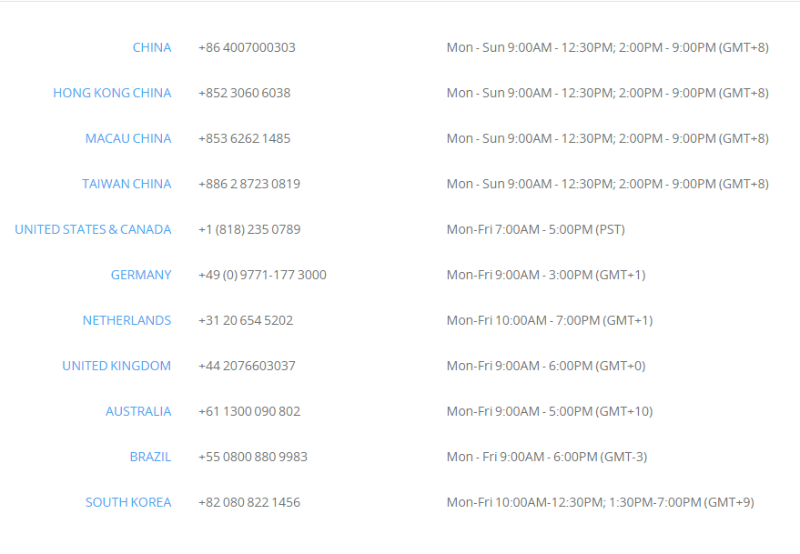
Below you will find phone numbers and available hours for each country where DJI Customer Support is available by phone.
Facebook and Twitter: How to Contact DJI Customer Support on Social Media
You can send a message to DJI Customer Support through Facebook Messenger @DJISupport if your drone is from a consumer series (Mavic, Spark, and Phantom series drones).

DJI support will respond to your request within minutes during operating hours.
You can also contact DJI Customer Support on Twitter. Send a private message (PM) to DJI Customer Support on Twitter @DJISupport.

YouTube: How to Contact DJI Customer Support on YouTube

On the DJI Support YouTube channel, you’ll find useful DJI official tutorials of every DJI product. You can also directly contact the DJI Facebook team from this page.

Forum: Resolving DJI Support Issues on the DJI Forum
A final method of resolving your DJI Support issues is to see what other pilots are talking about on the DJI Forum. On the forum, you may find that another pilot has already experienced your issue and found a solution.
What to Do if Your DJI Drone Gets Damaged: Submitting a Repair Request
So, your drone was damaged in an accident—what should you do? Well first, take up your due diligence and report the incident to the FAA (as required by the Part 107 rules if the accident resulted in serious injury to any person, any loss of consciousness, or damage to any property of $500 USD or more).
Then, you’ll likely want to take the next step of getting your drone repaired.
Dealing with customer service in the commercial and consumer drone market can be a pain, as it’s not always easy to tell who’s liable for the damage. Many factors could be to blame—operator error, signal interference, or a manufacturer defect for example.
If your DJI drone gets damaged, DJI will actually conduct a damage assessment and share with you everything about their data analysis. This helps you and DJI determine the exact cause of the accident and whether you’re eligible for a free repair or replacement.
There are a few ways to request a repair for your damaged DJI drone. You can (1) visit a DJI Authorized Service Center near you, (2) contact DJI Customer Support online to help you start a case, or (3) submit an online repair request by yourself.
Here’s how you submit an online repair request.
1. Visit the DJI Repair Services web page. Click ‘Online Repair Request’ and fill in the online form accordingly.

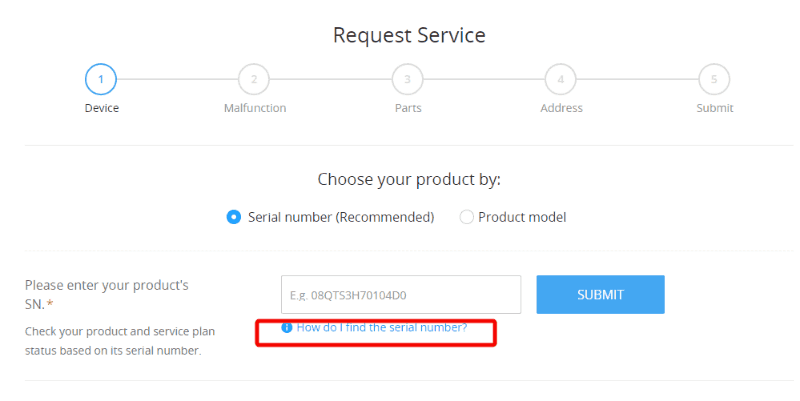
2. When filling out the form, make sure you fill out the Serial Number correctly. If you need help finding your serial number, you can check the tips. This page will show you how to find the exact serial number of your drone.
3. Next on the form, you’ll be asked to submit a short description of what’s going on with your drone. By providing details, you’ll help the DJI Support staff resolve your issue faster.

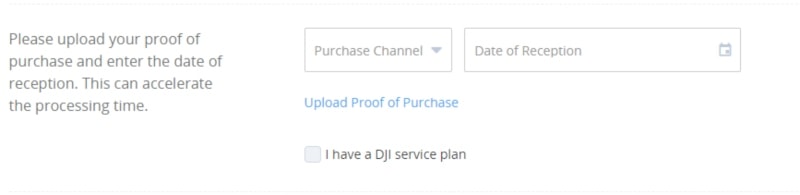
4. Then you’ll be asked to upload your proof of purchase. This enables DJI Support to see if you fit the return policy or to see if your drone is still under warranty. DJI will arrange for repair or replacement service at no cost if the problem falls under their Limited Warranty. For more extended coverage to protect you against problems such as water damage, consider investing in a DJI Care service plan.
5. If your drone is still under warranty and the damaged was not the pilot’s fault, you may apply for a data analysis. (Note: You can only apply for data analysis if your drone is still under warranty).
To apply for a data analysis, you’ll need to sync your flight record.
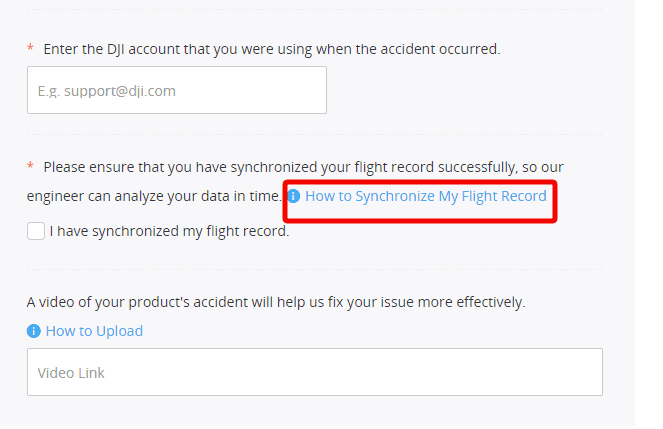
Make sure to sync your flight logs in your app. You can watch this YouTube tutorial on how to sync your flight logs, or follow these steps:
- For DJI GO, tap the “Flight Recorder” icon in the upper left corner.
- For DJI GO 4, tap the “Settings” icon in the upper right corner and then tap the “Flight Recorder” icon.
- Sync one month record and wait until it’s 100% completed.
Finally, you can include a video of your accident or damage. The video will better help the DJI Support staff with the analysis.

6. Confirm your receiving address and print your free shipping label.

After all your information has been confirmed, a free shipping label will be generated, and a case number that starts with CAS- will be generated.
Items not to include when shipping the item attached to your repair request include:
- Normally functioning or severely damaged battery
- Non-DJI products
- Intact propellers
- Normally functioning SD Card

If you want to check the repair status, you can input your serial number here.
DJI has made consumer drones easily accessible, even to people who have little or only beginner knowledge about drones. Novices and beginners are more likely to experience a crash, so DJI is putting in extra effort to educate their customers at all levels.
Some of the things DJI has done to reduce drone accidents among their customers include making professional video tutorials and making product instructions easy to find on nearly every platform, from the DJI official website to Youtube, Facebook, and the DJI Go/DJI Go 4 App.
Take advantage of all DJI’s instructional materials before you fly, and reduce your chance of having a crash. If you do experience a crash, know that DJI Customer Support is ready to help.