DJI Drones Are Back in Stock—Including the Mavic 4 Pro and the Mini 5 Pro
BY Zacc Dukowitz
29 October 2025DJI drones are back in stock.
After months of almost zero inventory, you can now buy DJI drones on Amazon again.
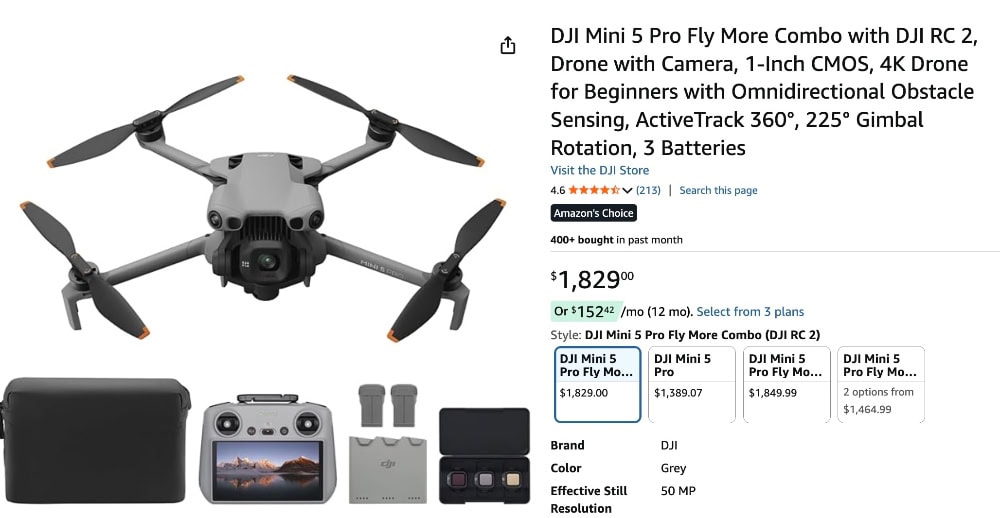
And it’s not just drones that were for sale before the stock dwindled. The brand new Mini 5 Pro is also in stock on Amazon—and so is the Mavic 4 Pro—even though DJI never officially launched either of them in the U.S.
What to Know Before You Buy
- Not sold by DJI. Current Amazon listings are from third-party marketplace sellers, not DJI directly. We recommend researching the history and trustworthiness of the seller you’re buying from before making a purchase.
- DJI’s stance is unchanged. DJI still says it has no U.S. inventory for older drones or for the Mini 5 Pro, and that it still hasn’t officially launched it or the Mavic 4 Pro here.
- Region-locked warranty. DJI warranties—and Care Refresh—are tied to the purchase region, so U.S. service may be denied for these drones if they were bought in another country.
- Policies vary by seller. Returns, support, and documentation depend on the individual storefront—so make sure to read the fine print before you buy.
Jump down for our tips for buying from 3rd parties on Amazon.
What DJI Drones Can You Buy Right Now?
The biggest news is that both the Mavic 4 Pro and the Mini 5 Pro are on sale.
Since the Mavic 4 Pro launched back in May it’s been almost impossible to get your hands on one in the U.S., and we expected it would be the same story with the Mini 5 Pro.
But both are currently in stock on Amazon.
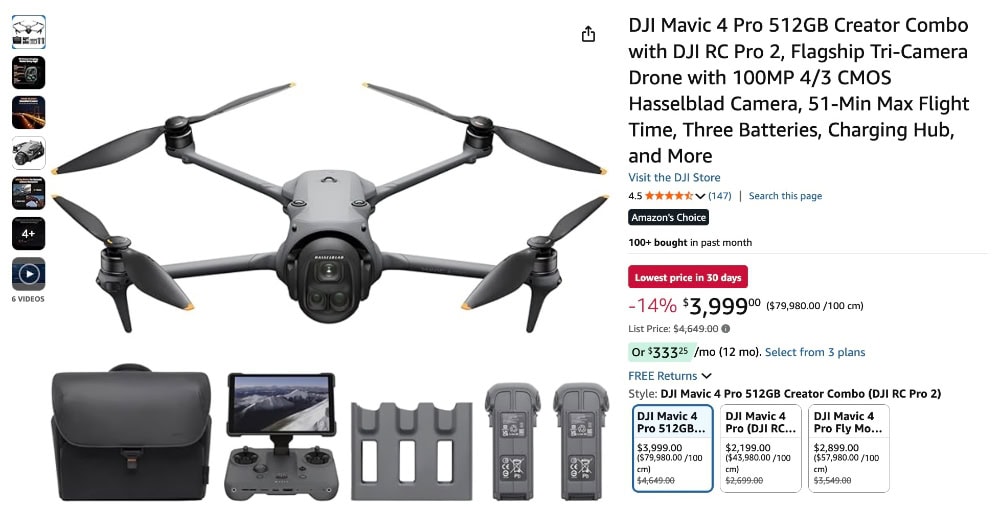
Here are the other DJI drones we’re seeing for sale from Amazon’s DJI store right now:
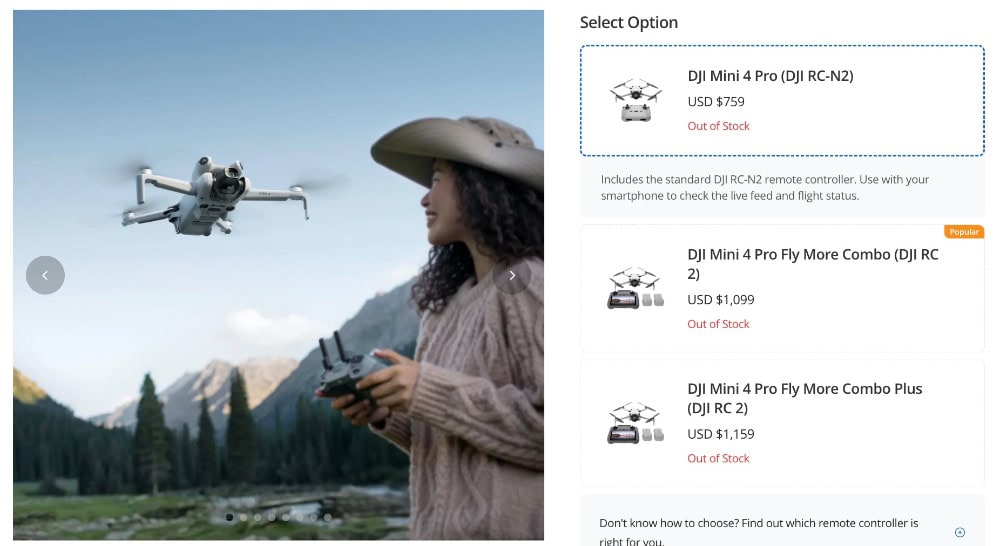
And even though these drones are available on Amazon, they’re still out of stock on the DJI website:
Tips for Buying from 3rd-Party Sellers on Amazon
TL;DR Summary
- Who you’re buying from—to determine if the seller is trustworthy.
- Which region the unit comes from—there are warranty implications if it’s not from the U.S.
- Warranty and return details so you know your options—get these in writing.
Note: Buying on Amazon does include some protection via the A-to-z Guarantee—but it’s still important to research the seller and read their policies carefully.
Use this list to protect yourself when buying a DJI drone sold by a third-party seller on Amazon.
1. Identify the Seller—Then Research Them
“Fulfilled by Amazon” doesn’t mean “sold by Amazon.”
To determine the seller, look directly under the Buy Now button:
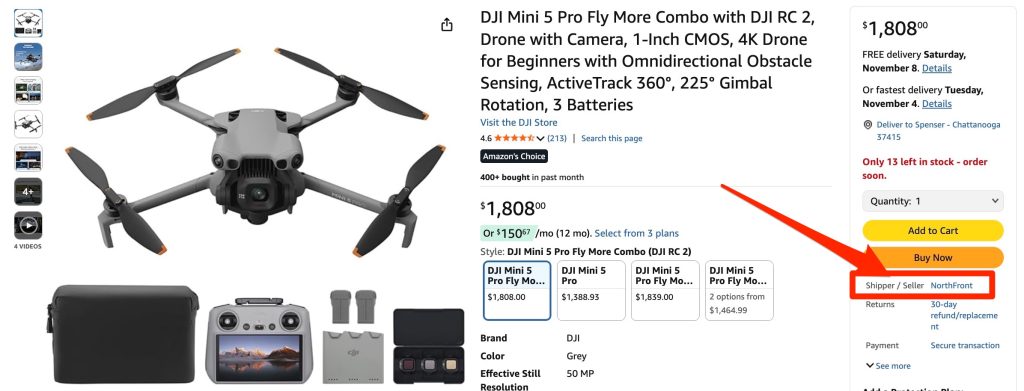
Click the seller name to open their profile and look for:
- Star ratings
- Comments on the seller profile and on the specific product you want to buy
- Volume and recency are important—higher volume combined with high stars is a good sign, and so is having several recent reviews
2. Confirm Region & Warranty—And Read the Fine Print
DJI warranties—and DJI Care Refresh—are region-locked. So if a drone was bought in another country, DJI won’t honor the warranty in the U.S.
To find out about where a drone was bought, write to the seller and ask.
Also, read the fine print to look out for:
- “International/Import version” language. This often signals non-U.S. stock and limited U.S. support.
- Check warranty language. Look for clear U.S. warranty terms and DJI Care Refresh eligibility tied to the serial/region.
- Verify model identifiers. Confirm exact SKU/part number and region code match the version you expect.
- Scrutinize the details. Flag mismatched photos/specs, missing serial info, or vague accessory lists.
- Note the seller’s address. An overseas business address can indicate an imported (“gray-market”) unit.
3) How to Identify Trusted Sellers on Amazon
Start on the product page and verify exactly who you’d be buying from—then cross-check that name against DJI’s official retailer info.
- Check the “Sold by” line. On the product page, find “Sold by <Seller Name>.” Click it to open the seller profile and review ratings, recent feedback, and policies.
- Don’t assume the DJI Amazon Store = DJI selling. Links from a brand’s Amazon Store usually point to the correct product (ASIN), but the Buy Box can rotate among multiple sellers. Treat Store links as a good starting point—not proof the item is sold by DJI or an authorized reseller.
- Cross-check authorization. Compare the seller’s legal/business name on Amazon (from their profile) with DJI’s official “Where to Buy” / Authorized Retailer listings. If the names don’t match, ask the seller to confirm authorization in writing—or assume standard DJI warranty support may not apply.
- Look for consistency. Authorized sellers typically show consistent brand content, complete specs, U.S. warranty language, and clear return terms. Inconsistencies (missing warranty details, vague policies) are signals to pause.
- When in doubt, prioritize clarity over speed. A slightly slower or pricier purchase from a clearly authorized seller often beats faster shipping with unclear warranty standing.
4. Keep a Paper Trail
Screenshot the full listing (price, seller, SKU, policies) before checkout.
Also, save order confirmations and serial numbers—all of this documentation could be useful if you end up needing Amazon’s A-to-z support later.