DJI FlySafe: Why Unlocking Geo Zones Is (Mostly) Obsolete
BY Zacc Dukowitz
30 January 2026Question: Do you still need to unlock DJI drones in DJI FlySafe?
Answer: No, you don’t. DJI stopped locking drones by geo zone on January 13, 2025. See the official statement here.
Overview: Most DJI pilots no longer need to manually unlock geo zones. DJI FlySafe now issues warnings instead of blocking flights. That means you can typically acknowledge the alert and keep flying—as long as you’re following FAA rules. However, unlocking may still be required for older drones, enterprise workflows, or public safety operations.
If you’ve been flying DJI drones for a while, you’re probably familiar with DJI FlySafe—the system that used to stop your drone cold if you entered restricted airspace.
But as of 2025, that’s no longer how things work.
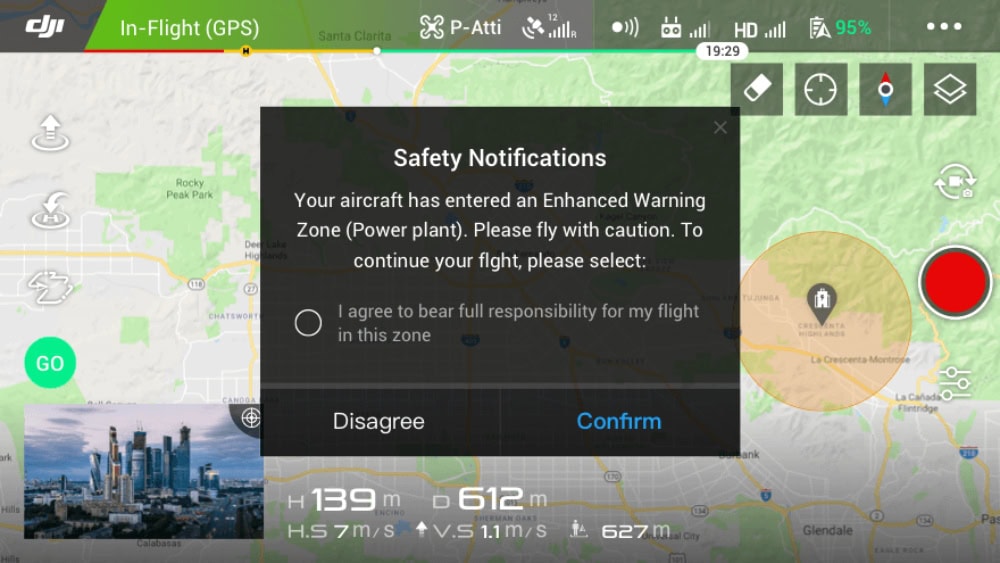
DJI no longer blocks takeoff or flight in most restricted zones.* Instead, it issues in-app warnings and leaves the final decision to you, the pilot.
*Note: There are two exceptions:
- Altitude Zones continue to limit your drone’s maximum flight height in certain areas.
- Regulatory Restricted Zones remain hardcoded into DJI firmware and will block takeoff or flight entirely—typically in sensitive government or security areas.
This change marks a major shift in how drone pilots interact with airspace restrictions.
DJI is stepping back, and that means you need to step up. The responsibility to understand where you can legally fly—and where you can’t—now falls on you, the pilot.
In this guide, we’ll break down how DJI FlySafe works in its current form, explain the different types of warnings you might see, and show you how those alerts connect (or don’t) to FAA regulations. We’ll also walk through the steps you should take any time you encounter a warning in the DJI Fly app, especially when you’re near restricted or sensitive areas.
Here’s a menu in case you’d like to jump around:
- What Is DJI FlySafe?
- Do You Still Need to Unlock DJI Drones in 2025?
- How DJI FlySafe Works in 2025
- DJI FlySafe vs FAA Rules—Know the Difference
- How to Know If It’s Legal to Fly—Your FAA Compliance Checklist
- 4 Real-World Flight Scenarios
- Useful Links
- DJI FlySafe FAQ
What Is DJI FlySafe?
DJI FlySafe is DJI’s integrated airspace awareness system, accessible via the DJI Fly app
DJI FlySafe helps drone pilots understand where they can and can’t fly. It works by displaying geo zones within the DJI Fly app and issuing in-app alerts when a drone enters or nears a restricted area.
While FlySafe used to enforce geofencing by physically blocking flights in certain zones, that’s no longer the case for most users.
Today, DJI FlySafe operates mainly as an advisory system. When you approach a restricted area, you’ll get a pop-up alert in the app—but you’re no longer automatically grounded.
The system won’t block takeoff or disable flight controls unless you’re flying an older drone with legacy firmware. In nearly all cases, it’s up to you to read the alert, understand what it means, and decide whether it’s legal to continue flying.

The different types of FlySafe Geo Zones
What Is the DJI FlySafe Map?
The DJI FlySafe map is a visual reference tool that shows DJI-defined geo zones.
It’s accessible through the DJI Fly app and on the web at dji.com/flysafe. Each zone is color-coded to reflect its advisory level, with additional details available when you tap or click on the area.
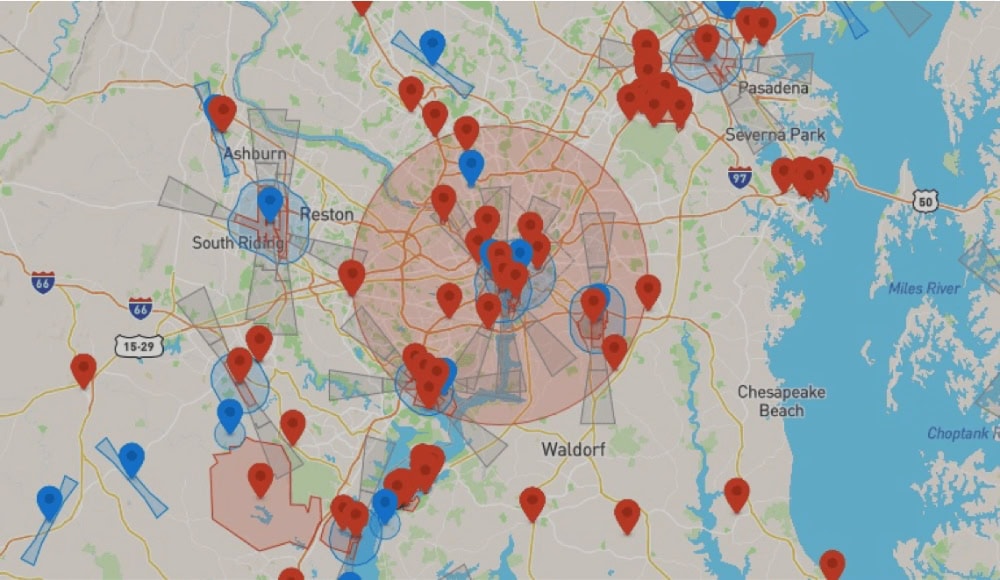
DJI FlySafe Map Example
You may also hear pilots refer to this tool as the DJI “no fly zone” map.
But that’s a bit of a misnomer now that DJI no longer enforces hard restrictions for most drone users. Now, the map serves as a helpful situational awareness tool, not a flight limiter.
Using the FlySafe map, you can preview potential airspace restrictions before you fly and understand what alerts might appear during a mission. But it’s important to note that this map may not reflect real-time airspace conditions, such as Temporary Flight Restrictions (TFRs), stadium rules, or local and state drone laws.
DJI FlySafe Map vs FAA Maps: Key Differences
To fly legally in the U.S., it’s important to compare the DJI FlySafe map with official FAA sources.
Here’s how the tools differ:
| Tool | What It Shows | FAA-Approved |
|---|---|---|
| DJI FlySafe Map | DJI geo zones (e.g. Enhanced Warning Zones, Authorization Zones) | No – advisory only |
| B4UFLY App | Real-time TFRs, stadium rules, special use airspace | Yes – FAA source |
| FAA UAS Facility Maps | Controlled airspace near airports, LAANC availability | Yes – FAA source |
DJI Geo Zones Explained
DJI’s FlySafe system is built around a set of virtual boundaries known as geo zones.
These zones serve as airspace alerts and advisory markers, and they vary based on the sensitivity of the area.
Here are the most common types of DJI geo zones and how they work in 2025:
- Warning Zones. These are the least restrictive DJI geo zones. They trigger a simple in-app alert to notify you of sensitive airspace nearby but don’t require unlocking. Pilots can fly freely after acknowledging the alert—though checking FAA rules is still advised.
- Enhanced Warning Zones . These zones often surround restricted airspace near locations like airports or power plants. DJI will display a “Proceed with caution” alert when entering one. You can fly without unlocking, but should double-check FAA rules before proceeding.
- Restricted Zones . These represent high-security or no-fly areas. You’ll typically see a “Restricted Zone Ahead” warning. Most current DJI drones will allow you to fly through with a warning, but older models may still enforce hard stops or require unlocking.
- Authorization Zones. These previously required manual unlocks via DJI’s FlySafe portal. In 2025, most modern drones now allow flight after acknowledging an in-app warning, though some enterprise workflows may still require formal authorization.
- Altitude Zones . These zones limit how high your drone can fly in a given area. DJI will restrict your max altitude and display a warning if you attempt to exceed it—typically near airports or high-density areas.
- Regulatory Restricted Zones. These zones are hardcoded into DJI’s firmware to comply with specific government regulations. When you enter one, your drone will typically be blocked from flying entirely. These areas often include prisons, border zones, and other national security sites. You’ll see a “Flight restricted in this area” warning, and you won’t be able to fly—even if you acknowledge the alert.
For a quick reference chart comparing alert types, see the Visual Breakdown chart below.
What Are DJI Airport Geo Zones?
Airport Geo Zones are special geofencing patterns DJI uses around airports to reflect the varying safety risks of manned aircraft operations.
These zones include combinations of Restricted, Authorization, Enhanced Warning, and Altitude Zones, and their shape and size depend on the airport’s risk classification (high, medium, or low).
- High-risk airports have tightly layered zones, including a central Restricted Zone around the runway and extended Altitude Zones along flight paths.
- Medium-risk airports include Authorization and Enhanced Warning Zones but generally allow more flexibility for drone flights.
- Low-risk airports may have only Enhanced Warning Zones, with fewer restrictions on surrounding airspace.
While these zones are shown on the DJI FlySafe map, pilots should always confirm airport proximity and restrictions using FAA tools like B4UFLY or LAANC apps—especially since DJI’s maps may not reflect real-time NOTAMs or Temporary Flight Restrictions.

Do You Still Need to Unlock DJI Drones in 2025?
In most cases, no.
In DJI’s new advisory-only model, most drone pilots no longer need to manually unlock restricted zones before flying.
As long as you’re flying a drone with updated firmware, you’ll usually see a warning, then continue flying after acknowledging it.
But there are still some exceptions.
In certain cases, DJI’s older unlocking system is still active. If you fall into one of the groups below, you may still need to submit an unlock request through DJI’s FlySafe portal or use a custom workflow.
When Unlocking Is Still Required
Here are the three scenarios that still call for unlocking:
1. Older drones with outdated firmware
Some legacy DJI drones—especially those running older firmware—may still enforce automatic restrictions in certain geo zones. These drones require a manual unlock request, just like in the past. A firmware update may remove the block, but check your model’s compatibility before flying.
2. Public safety and government operators
Law enforcement, fire departments, and other public agencies often operate in restricted zones under special permissions. DJI offers custom unlock workflows for these use cases, including rapid-response capabilities for emergency flights.
3. Enterprise pilots using DJI Pilot 2
Commercial teams operating fleets of DJI drones—especially through DJI Pilot 2 or the DJI Dock ecosystem—may still use geofencing as part of their internal safety protocols. Unlocking requests might be integrated into pre-flight workflows for high-risk sites or classified jobs.
If you’re a recreational or Part 107 pilot using current hardware, you likely won’t need to unlock anything. But if you do need to go through the process, DJI still offers support via its official FlySafe portal.
How to Submit a DJI Geo Zone Unlock Request
Unlocking is unusual these days. But if you still need to do it, here’s how:
- Visit the DJI FlySafe Portal
Go to https://www.dji.com/flysafe and log in with your DJI account. - Click “Unlocking Requests”
Choose “Zone Unlocking” to request access to a specific area. - Select Your Drone and Zone
Pick your aircraft model and use the map to select the geo zone you want to unlock. - Enter Flight Details
Provide your planned flight time, date, and reason. Some zones may require FAA authorization (for U.S. pilots) or documentation. - Submit the Request
Follow the prompts to complete submission. Most requests for eligible users are processed instantly or within a few minutes. - Sync with Your Drone
Open the DJI Fly app (or Pilot 2), log in with the same account, and sync your flight license under the “Unlocking List.”
How DJI FlySafe Works Today
As of 2025, DJI has fully transitioned to an advisory-based approach for airspace awareness.
Previously, DJI drones could block takeoff or restrict flight paths near airports, prisons, power plants, and other sensitive locations. Today, most of those restrictions are gone—at least in terms of DJI’s enforcement.
Instead of locking pilots out of geo zones, DJI now delivers in-app warnings when your drone approaches or enters a sensitive area.
You’ll see alerts like “Restricted Zone Ahead” or “Max Altitude Limit Reached,” but in most cases, your drone will continue to fly normally unless you have an older model or outdated firmware.
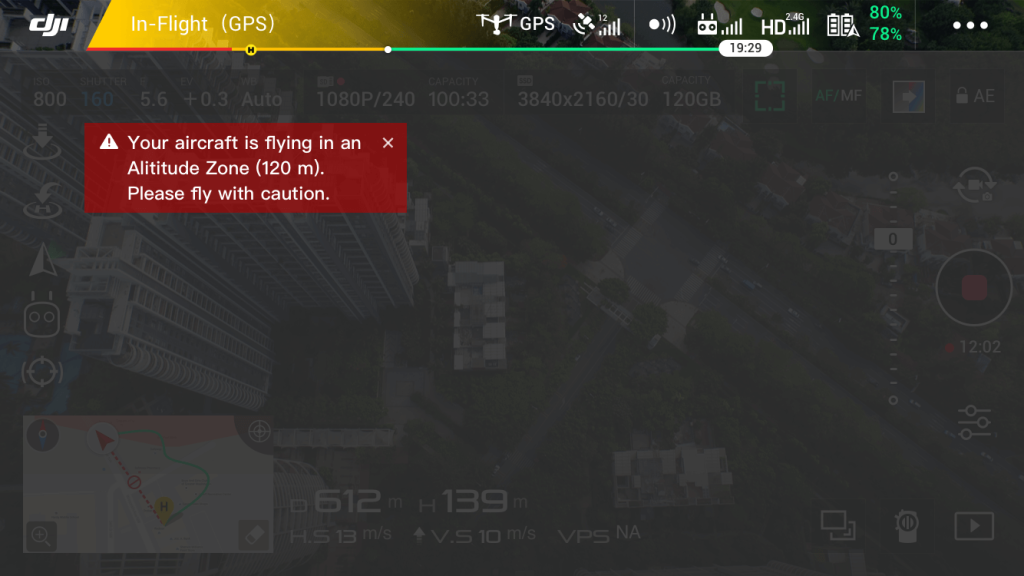
Visual Breakdown: Understanding DJI Airspace Alerts
When you receive a DJI FlySafe alert, it’s important to understand what the message means and what action—if any—is required.
Here’s a quick breakdown of the most common DJI geo zone types, the alerts you might see, and how to respond:
| DJI Zone Type | Alert Example | Can You Fly? | FAA Approval Required? |
|---|---|---|---|
| Warning Zone | “Warning zone nearby” | Yes – advisory only | Maybe – check FAA map |
| Enhanced Warning Zone | “Proceed with caution” | Yes – advisory only | Maybe – check FAA map |
| Authorization Zone | “Authorization zone ahead” | Yes – advisory only (unlocking not required on most drones) | Yes – if in controlled airspace |
| Restricted Zone | “Restricted zone ahead” | Maybe – depends on drone model and firmware | Yes – FAA approval required |
| Altitude Zone | “Max altitude limit reached” | Yes – if under altitude limit | Maybe – depends on airspace class |
| Regulatory Restricted Zone | “Flight restricted in this area” | No – flight blocked | Yes – typically off-limits due to law enforcement or security rules |
DJI FlySafe vs FAA Rules—Know the Difference
FlySafe alerts are designed to promote situational awareness, but they may not include key real-time information about the airspace in which you’re flying or plan to fly.
Common examples of what DJI FlySafe may miss include:
- Temporary Flight Restrictions (TFRs). Includes those for wildfires, presidential visits, or breaking news events.
- National Park boundaries. Flying drones in National Parks is prohibited under federal land rules.
- Stadium TFRs . No-fly zones during major sporting events that often go unflagged by DJI.
- State or local drone laws. Includes bans near prisons, schools, or in city parks.
The next section includes a step-by-step walking you through how to ensure your flight is legal, including a list of FAA-approved sources for airspace data in Step 2.
How to Know If It’s Legal to Fly—Your FAA Compliance Checklist
Use this step-by-step checklist to verify your flight is compliant with FAA rules—especially when a DJI warning appears.
1. Read the DJI FlySafe Alert
Before launching, check the DJI Fly app for alerts like “Enhanced Warning Zone” or “Restricted Zone Ahead.” These indicate you’re near sensitive airspace—but they don’t tell the full story.
2. Check FAA-Approved Airspace Tools
Use FAA resources to confirm whether the airspace is actually restricted:
- B4UFLY for real-time airspace status and TFRs
- FAA UAS Facility Maps for controlled airspace near airports
- LAANC apps like Aloft or OpenSky for requesting airspace authorizations
3. Request LAANC Authorization if Needed
If you’re flying in controlled airspace:
- Part 107 pilots must request FAA authorization
- Recreational pilots can also use LAANC where available
If LAANC is unavailable, apply via the FAA’s Drone Zone or choose a different place to fly. Also, see our guide to LAANC to learn more about how it works.
4. Check for Temporary Flight Restrictions (TFRs)
TFRs are time-sensitive flight bans issued by the FAA. They don’t always appear in DJI FlySafe. Check for active TFRs here.
5. Make Your Final Decision Based on FAA Rules
If FAA tools show a restriction, don’t fly—even if DJI says it’s okay. DJI FlySafe is only advisory. Legal responsibility lies with you, the pilot.
4 Real-World Flight Scenarios
To better understand how DJI FlySafe and FAA rules work together, let’s walk through a few real-world scenarios.
These examples highlight how to interpret DJI alerts, verify legality, and take the right action before flying.
Scenario 1: Flying Near a Hospital Helipad
You’re planning to fly near a large urban hospital. The DJI FlySafe app shows an Enhanced Warning Zone and gives you a “Proceed with caution” alert.
- DJI Action: Advisory warning only—flight not blocked.
- FAA Check: Use B4UFLY to confirm whether a TFR or controlled airspace applies. If near Class B, C, D, or E airspace, LAANC may be required.
- Next Step: If the area is uncontrolled and no TFR exists, you can fly—but avoid the helipad, keep VLOS (Visual Line of Sight), and respect emergency air traffic.
Scenario 2: Commercial Shoot Near a Stadium on Game Day
A client wants aerial footage of their building next to a stadium. The DJI FlySafe map doesn’t show any restrictions.
- DJI Action: No warning—FlySafe map appears clear.
- FAA Check: Check tfr.faa.gov for active stadium TFRs, which are common during events.
- Next Step: If a TFR is in place, delay the flight. Flying during the restriction window could lead to legal penalties—even if DJI allows takeoff.
Scenario 3: National Park Landscape Footage
You want to capture stunning drone shots in a U.S. national park.
- DJI Action: No warning in FlySafe; map appears clear.
- FAA Check: Drone flights are prohibited on National Park Service land under federal rules, even if DJI doesn’t show a restriction.
- Next Step: Don’t fly. This is a protected area with steep fines for unauthorized drone use.
Drones are prohibited at National Parks—learn more here.
Scenario 4: Rural Property Survey Near a Small Airport
You’re conducting a Part 107 roof inspection near a rural property that borders a Class E airport.
- DJI Action: Restricted Zone warning appears in-app.
- FAA Check: Use FAA UAS Facility Maps to check if LAANC is available.
- Next Step: Submit a LAANC request using an approved app. Once granted, proceed with the flight according to the authorized parameters.
These scenarios show how important it is to use DJI FlySafe as a situational tool—but always verify flight legality through FAA resources.
Useful Links
DJI FlySafe can help you avoid surprises, but understanding the full legal picture ensures you stay safe and compliant every time you take off.
Here are some helpful links for your airspace research.
FAA Resources
- FAA Drone Zone . The official hub for drone registration, Part 107 certification, and airspace authorization requests
- B4UFLY . FAA’s real-time airspace awareness app for recreational and commercial pilots
- FAA UAS Facility Maps. Check controlled airspace and LAANC availability around airports
- FAA TFR Map. Get current Temporary Flight Restriction updates across the U.S.
DJI Resources
- DJI FlySafe Portal. View geo zones, review flight history, and manage zone unlock requests
- DJI FlySafe Map. Explore DJI’s real-time advisory zones and understand what alerts may appear
DJI FlySafe FAQ
Here are answers to commonly asked questions about DJI FlySafe, geo zones, and related topics.
What is DJI FlySafe?
DJI FlySafe is DJI’s airspace awareness system. It provides in-app alerts to help drone pilots avoid flying in restricted or sensitive areas like airports, stadiums, and military zones.
What are DJI geo zones?
DJI geo zones are virtual airspace boundaries created by DJI. They include Enhanced Warning Zones, Restricted Zones, Authorization Zones, and Altitude Zones, each with different levels of alerts and flight limitations.
How does DJI FlySafe work today?
As of 2025, DJI FlySafe no longer blocks drone flights in most restricted zones. Instead, it issues advisory warnings through the DJI Fly app, leaving the final decision up to the pilot.
Do I still need to unlock DJI geo zones?
No. Most drone pilots no longer need to manually unlock DJI geo zones. However, unlocking may still be required in certain cases—like flying older DJI drones, operating in enterprise environments, or performing government or public safety missions.
What is the DJI FlySafe map?
The DJI FlySafe map shows geo zones where advisory alerts may be triggered. It’s a useful visual tool for identifying airspace concerns, but it doesn’t replace FAA-approved maps for determining legal flight areas.
Can I fly in a DJI Enhanced Warning Zone?
Yes, you can usually fly in an Enhanced Warning Zone after acknowledging the warning in the app. However, you must still verify that the airspace is legally accessible under FAA rules.
Does DJI FlySafe replace FAA rules?
No, DJI FlySafe does not replace FAA regulations. It’s an advisory system created by DJI, while the FAA is the legal authority that governs drone airspace access in the U.S.
What happens if I ignore a DJI FlySafe warning?
If you ignore a DJI FlySafe alert and fly into restricted airspace without FAA authorization, you could be violating federal, state, or local laws. DJI won’t stop you—but the legal consequences are still your responsibility.
What’s the difference between DJI FlySafe and FAA airspace rules?
DJI FlySafe offers helpful advisories based on preloaded airspace data, while FAA airspace rules are the official legal standard. FAA maps reflect real-time updates like TFRs and local restrictions that DJI may not include.
How do I check if it’s legal to fly my drone?
Use FAA-approved tools like B4UFLY, FAA UAS Facility Maps, or a LAANC app such as Aloft or OpenSky. These tools provide real-time airspace data and help ensure you’re flying within legal limits.
Do I need a DJI FlySafe login?
You don’t need to log in for normal recreational or commercial flights. However, logging into DJI FlySafe can be helpful for managing unlocking requests, viewing flight history, or syncing data across multiple devices.
Does DJI FlySafe show Temporary Flight Restrictions (TFRs)?
Not always. DJI FlySafe may miss real-time TFRs issued by the FAA, such as those related to wildfires, large events, or VIP travel. Always check FAA sources to stay current.
What can I do in the DJI FlySafe portal?
At dji.com/flysafe, you can view your zone unlock history, check past flight alerts, and link devices across apps. While most hobbyist and commercial pilots won’t need these features, enterprise and government users may still rely on them for airspace management.