360 Drones: Top Models on the Market & More [New for 2026]
BY Zacc Dukowitz
6 February 2026A 360 drone—sometimes called an invisible drone—uses a 360° camera to capture fully immersive imagery, letting viewers look in every direction from a single location.
For creators, this means dynamic fly-throughs and reframing flexibility in post. For commercial teams, this means comprehensive visual context for inspections, real estate marketing, destination promotion, and training content that feels like you’re actually there in person.
To understand what a 360 drone can do, it helps to see some footage:

That video shows you the kinds of shots you can get with a 360 camera. And this one shows you the immersive VR (virtual reality) experience you can create with a 360 drone (make sure to click in the video and move it around):

Over the last few years, 360 camera drones have transitioned from novelty to practical tool.
Action-style 360 cameras are lighter, stitching is cleaner, and mounts designed for popular airframes make setup faster and safer. The result: higher production value for filmmakers, more engaging property tours for realtors, and better situational awareness for industrial stakeholders—all without complex multi-camera rigs.
This guide covers how 360 capture works in the air, the best 360 drones on the market, and how to use a drone with a 360 camera. We compare top applications, break down pricing, and cover practical workflows for photos, video, and VR.
Here’s a menu in case you want to jump around:
- What Is a 360 Drone?
- Best Drones with 360 Cameras in 2026
- Best Software for Editing and Processing 360 Drone Footage
- How to Use a Drone with a 360 Camera
- 5 Top Ways 360 Drones Are Used
- 360 Drone FAQ
- 360 Drone Glossary
What Is a 360 Drone?
A 360 drone is a drone with 360-degree camera capability, allowing it to capture imagery in every direction at once.
By every direction, we mean that a 360 camera drone records a full sphere, letting you reframe shots later without flying again. (Yes, there are some gaps to that sphere—these are cleaned up through stitching, which we’ll explain later.)
Aerial 360 capture uses dual ultra-wide lenses whose overlapping views are stitched into a single spherical (equirectangular*) photo or video. Modern stabilization smooths yaw and tilt, and reframing tools let you pull standard 16:9 or vertical clips from the same master file.
*See the glossary for a definition of equirectangular and other technical terms.

Two Types of 360 Drones
Until recently, capturing aerial 360 footage required mounting a 360 camera on a standard drone.
Now, with the launch of the Antigravity A1—the first drone designed with a native, integrated 360 camera—there are two types of 360 drones:
- Integrated 360 Drones: Airframes built around a fully integrated 360 camera system, offering seamless stabilization, stitching, and controls out of the box.
- Drone + 360 Camera Combos: Traditional drones paired with lightweight 360 action cameras mounted via specialized adapters, offering flexibility and a wider range of camera options.

The Antigravity A1
How Much Does a 360 Drone Cost?
Costs for a 360 camera drone hinge on your route: an integrated 360 platform or a mainstream drone paired with a 360 camera and mount.
The 360 drone price also shifts with flight time, stabilization quality, and how streamlined you want the workflow to be.
Price Ranges by Category
| Category | What’s Included | Typical Cost Tier | Notes |
| Consumer combo | Lightweight drone + entry 360 camera + basic mount | Low → Medium | Good for learning and social content; shortest setup and flight times |
| Prosumer combo | Flagship consumer drone + mid/high 360 camera + dedicated mount | Medium | Balanced image quality, reliability, and value; flexible upgrade path |
| Professional combo | Enterprise airframe + higher-end 360 camera + robust mount/workflow | Medium → High | Best for teams needing stability, accessories, and support options |
| Purpose-built integrated 360 drone | Antigravity A1 (native, integrated 360 system) | High | Turnkey 360 capture and streamlined post; less modular than combos |
| Add-on camera only | 360 camera + mount for a drone you already own | Low → Medium | Most cost-effective if you already have a compatible airframe |
Best Drones with 360 Cameras [New for 2025]
Up until recently, if you wanted to get aerial 360 footage you had to pair a mainstream drone with a 360 action camera from a company like Insta360.
But now we have the A1—the first integrated option on the market.
Given these different ways you can shoot aerial 360 footage, in this section we share three groups of products—the top integrated 360 drone, the top drone-compatible 360 cameras, and the best drone + 360 camera combos.
1. The Best Integrated 360 Drone
The Antigravity A1 is the only drone with an integrated 360 camera—so it’s the only one listed here, for now.
I. The Antigravity A1
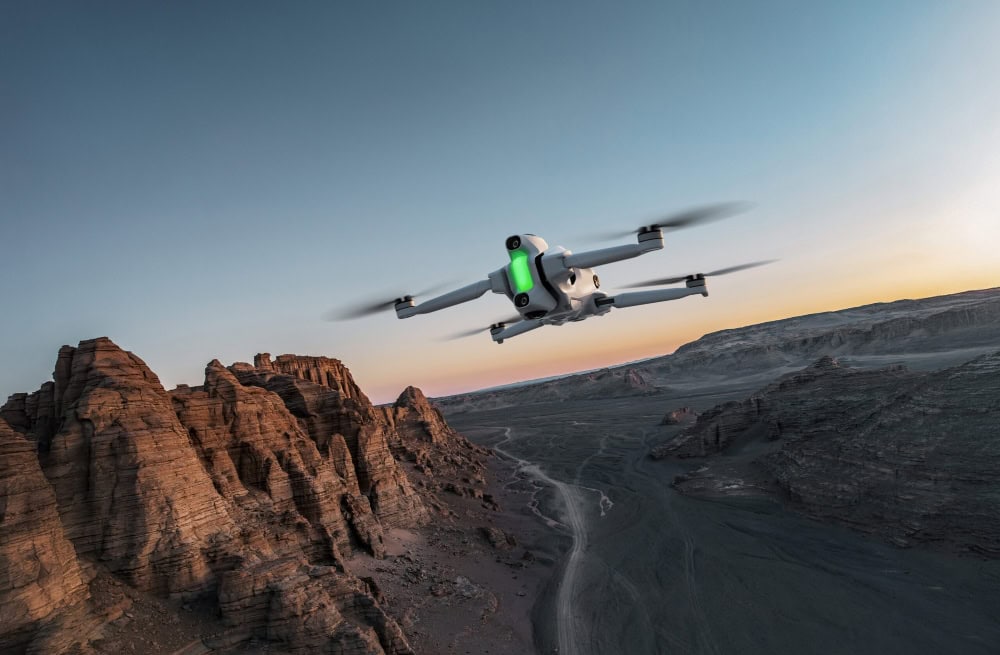
Antigravity’s A1 stands out as the first purpose-built drone with a native 360 camera integrated into its design.
This integration delivers balanced flight, seamless stabilization, and optimized stitching, simplifying both filming and post-production workflows.
Here are the A1’s key specs:
- Camera. Dual-lens setup with 8K 360° capture at up to 60fps. Think: incredibly sharp, immersive footage from every angle.
- Weight. Sub-249g. No FAA registration required for recreational use in the US—just grab it and go.
- Flight time. Up to 29 minutes per battery. Enough for long, uninterrupted flights.
- Transmission range. Up to 7km (about 4.35 miles). Stay connected whether you’re on open ground or just flying around the yard.
- Obstacle avoidance. Multiple sensors for safer flying, especially for beginners and in tricky environments.
2. The Best 360 Cameras for Drone Mounting
Here are the top drone-compatible 360 cameras on the market.
I. Insta360 X4

Key specs for the Insta360 X4:
- Camera. Shoots up to 8K 30fps 360° video or 5.7K at 60fps
- Stabilization. Features FlowState stabilization with 360° horizon lock for ultra-smooth footage
- Weight & design. .45 pounds (203 g) with a rugged waterproof design
- Display. Large 2.5″ touchscreen
- Battery. 2290mAh battery with up to 135 minutes recording time
- Software. AI-powered reframing tools for creative editing
Learn more about the Insta360 X4.
II. DJI Osmo 360

Key specs for the DJI Osmo 360:
- Sensors & video. Dual 1″ HDR sensors, captures sharp 8K video at 50fps with excellent dynamic range and color fidelity
- Mounting & stabilization. Designed for easy drone mounting with HorizonSteady stabilization
- Features. Supports 360° horizon leveling and remote activation
- Design. Compact form factor optimized for aerial use
Learn more about the DJI Osmo 360.
III. GoPro MAX

Key specs for the GoPro MAX:
- Video capture. Provides 5.6K 30fps 360-degree video capture with HyperSmooth stabilization
- Weight & waterproofing. Weighs about .33 pounds (154 g), waterproof up to 16ft (5m)
- Audio. Features 360 audio capture
- Versatility. Doubles as a traditional action cam with multiple mounting options, suitable for aerial and ground use
Learn more about the GoPro MAX.
3. DIY Drone + 360 Camera Combos
Using specialized mounts, you can pair a consumer drone with a lightweight 360 camera.
This DIY approach offers more flexibility—but it also requires additional setup, balancing, and some related technical knowledge.
Popular Drones for 360 Camera Mounting
- DJI Mavic 3. Known for stable flight and long battery life, the Mavic 3 has a reliable payload capacity, making it a solid choice for mounting 360 cameras.
- DJI Air 3S. Offers advanced obstacle avoidance and great portability, favored for versatile and dynamic aerial 360 setups.
- Autel EVO Lite+. Praised for its strong flight performance and flexibility, making it a favorite among creators looking to pair with drone-compatible 360 cameras.
See the previous section for the top 360 cameras you can combine with these drones to create versatile aerial 360 setups.
Best Software for Editing and Processing 360 Drone Footage
Editing 360 drone footage requires specialized software designed to handle spherical video, stitching corrections, stabilization, and reframing.
Whether you’re a casual creator or a professional filmmaker, choosing the right tools can streamline your workflow and maximize the impact of your immersive content.
Key Features to Look For
- Stabilization. Smooth out drone jitters and motion with advanced stabilization algorithms tailored for 360 footage.
- Seamless stitching. Automatically correct stitching errors and minimize visible seams or distortion artifacts.
- Reframing and export options. Extract traditional flat formats (16:9, vertical, square) from spherical footage and export in multiple resolutions, including VR-ready formats.
- VR compatibility . Support for interactive VR previews and exports to major VR platforms.
- AI-assisted editing. Tools that offer automated shot selection, reframing, and color correction powered by AI for faster turnaround.
- Multi-format support. Ability to handle various 360 camera file types and integrate well with popular NLE (non-linear editing) platforms.
Popular 360 Drone Software Options

A screenshot from Insta360 Studio
1. Insta360 Studio
Insta360 Studio is a free, user-friendly software designed primarily for Insta360 cameras but supports many spherical video formats. It simplifies the stitching process, offers easy reframing, and supports exporting in multiple formats, making it ideal for quick edits and workflow efficiency.
- Compatibility: Optimized for Insta360 cameras, supports other 360 formats
- Key features: Stitching, reframing, export tools
- Accessibility: Free to use with a simple interface
- Platform support: Windows and Mac
Learn more about Insta360 Studio.
2. Adobe Premiere Pro
Adobe Premiere Pro is the industry-leading video editor with robust VR and 360-degree video editing capabilities. It supports native spherical video formats, advanced reframing, and powerful color grading tools, making it suited for professional filmmakers and content creators.
- VR editing tools: Native support for spherical video and VR workflows
- Reframing: Allows dynamic viewpoint adjustments post-capture
- Integration: Seamlessly integrates with other Adobe Creative Cloud apps
- Platform support: Windows and Mac
Learn more about Adobe Premiere Pro.
3. Final Cut Pro
Final Cut Pro offers comprehensive tools for immersive video editing, including strong 360-degree video support and seamless integration with the macOS ecosystem. It is a preferred choice for Mac users looking for powerful editing with high performance.
- Immersive tools: Native 360 video editing and effects
- Performance: Optimized for Mac hardware for smooth editing
- Integration: Works well with Final Cut libraries and motion graphics
- Platform support: macOS only
Learn more about Final Cut Pro.
4. GoPro Player + ReelSteady VR
GoPro Player is designed for easy viewing and initial edits of 360 footage from GoPro MAX and similar cameras. ReelSteady VR complements it with superior stabilization and post-processing capabilities, making it a favorite for smooth, professional 360 videos.
- Stabilization: Industry-leading ReelSteady VR stabilization
- Compatibility: Tailored for GoPro MAX and similar formats
- Editing features: Basic editing in GoPro Player, advanced fixes in ReelSteady
- Platform support: Windows and Mac
Learn more about GoPro Player and about ReelSteady VR.
5. VeeR Editor
VeeR Editor is a cloud-based, collaborative platform designed for 360 and VR content creation. It enables remote editing and sharing, allowing teams to work efficiently on immersive videos regardless of location.
- Cloud-based: Remote editing and collaboration
- User-friendly: Suitable for beginners and teams
- Features: Basic editing, transitions, and effects
- Platform support: Web-based, accessible on most devices
How to Use a Drone with a 360 Camera
Using a 360 drone blends flight skills with camera craft. The goal is smooth, unobstructed capture you can reframe later without flying again.
Mastering both piloting techniques and specialized 360 filming practices is key to unlocking the full creative potential of immersive aerial content.
Here’s a step-by-step guide for how to use a 360 drone.
1. Pre-Flight Planning and Preparation
- Shot planning. Choose subjects that benefit from immersive views, and map out a smooth, level flight path.
- Lighting. Aim for soft, even light to minimize harsh shadows and visible stitch lines. Lock exposure and white balance settings if possible.
- Camera mounting (if needed). Verify mount compatibility with your drone’s airframe. Position the camera to keep props and drone body out of frame to reduce stitching errors. Check weight and balance to avoid adversely affecting flight performance. Ensure sensors, antennas, and GPS are unobstructed by the mount or camera. Perform a test hover to confirm stable mounting and clean stitching before full flight.
- Equipment checks. Confirm battery levels, secure all hardware, and verify camera settings.
2. Flight Execution for 360 Capture
- Stability. Fly gently and steadily at a consistent speed. Avoid abrupt yaw, roll, or altitude changes to minimize stitch artifacts.
- Altitude. Maintain clear line of sight to the subject and level horizons for easier stitching.
- Wind and environment. Avoid gusty or turbulent conditions that cause vibration or shake.
- Camera positioning. Double-check the camera remains clear of props and drone body during flight.
- Hovering. Pause mid-air to capture static shots or complex scenes with less motion blur and better stitching.
3. Post-Flight Processing and Editing
- Data management. Transfer footage promptly to secure storage and keep backups of original files.
- Stitching. Use software optimized for your 360 camera to create seamless spherical videos or photos.
- Quality control. Review stitched footage for visible seams, distortions, or jitter, and correct where needed.
- Reframing. Extract traditional flat clips (e.g., 16:9, vertical, square) from your 360 master files for multiple platforms.
- Color grading. Apply enhancements while maintaining spherical consistency.
- Backup. Safely store final edits and raw footage to prevent data loss.
Troubleshooting Common Issues
Like any advanced imaging process, 360 drone footage faces unique challenges. Knowing how to identify and fix common problems helps maintain professional quality.
- Stitching errors. Look for mismatched edges, warped lines, or double images; adjust camera position, flight path, or use advanced stitching software features to minimize.
- Nadir artifacts.* These black or distorted spots directly beneath the drone can be reduced by proper camera mounting and software nadir patching tools.
- Drone vibration. Causes jittery footage; mitigate this with balanced mounts, vibration dampeners, and smooth flight control.
- Livestream connectivity glitches. Address by optimizing network strength, adjusting bitrate, and doing thorough test flights to avoid disruptions during real-time broadcasts.
*See the glossary for a definition of equirectangular and other technical terms.
5 Top Ways 360 Drones Are Used
A 360 drone expands what audiences can see and feel, capturing every direction from a single flight.
With a drone with 360 degree camera capability, teams can produce immersive visuals for storytelling, marketing, documentation, and training—without complex multi-camera rigs.

1. Immersive Filmmaking & VR
360 capture lets filmmakers place viewers inside the scene, then reframe in post for multiple angles from one flight. It’s a fast path to VR-ready content with natural movement and high situational awareness.
- Cinematic fly-throughs for films and brand spots.
- Documentary establishing shots with full spatial context.
- VR experiences for museums, venues, or events.
- Sports and action sequences with dynamic reframing.
2. Real Estate Marketing (Interactive Tours)
Interactive 360 tours show scale, flow, and sightlines better than flat photos. Buyers explore properties room-to-room and lot-to-lot from a single spherical capture.
- Exterior fly-arounds that transition into interior walk-throughs.
- Neighborhood orientation: schools, parks, and commute corridors.
- Luxury listings with immersive amenities showcases.
- Commercial developments for leasing and investor briefings.
3. Tourism and Destination Promotion
Tourism boards and hospitality brands use aerial 360 to highlight experiences rather than just locations. Viewers can scout viewpoints, trails, and accommodations before they arrive.
- Iconic landmarks presented as explorable spheres.
- Resort and hotel campus previews with beach or pool access.
- Adventure activities like zip-lines, kayaking, or ridge hikes.
- City walkabouts that connect plazas, markets, and transit.
4. Industrial Inspections (360° Visual Data Capture)
Aerial 360 improves situational awareness around assets, work zones, and confined spaces. Teams document conditions once, then revisit details from any angle in post.
- Pre-shutdown site surveys for scaffolding and access planning.
- Tanks, stacks, and pipe racks with full-context visual records.
- As-built verification and progress tracking on capital projects.
- Training materials for HSE briefings and contractor onboarding.
5. Social Media Content Creation
Creators reframe a single 360 master into multiple formats for different platforms. One flight yields landscape videos, vertical shorts, and square carousels without re-shooting.
- Reframed clips for TikTok, Instagram Reels, and YouTube Shorts.
- Behind-the-scenes fly-throughs that showcase spaces and events.
- Interactive posts that invite viewers to explore scenes.
- Branded campaigns with consistent multi-format assets.
360 Drone FAQ
Here are answers to the most commonly asked questions about 360 drones.
Does DJI have a 360 camera?
Yes. DJI now offers a dedicated 360 camera called the Osmo 360, giving pilots the ability to capture immersive spherical photos and video without third-party accessories. The release marks DJI’s first native step into 360 capture.
How much does an Insta360 camera cost?
The cost of an Insta360 depends on the model and feature set. Entry-level versions are designed for casual creators, while higher-end cameras support resolutions up to 8K with advanced stabilization and professional controls. For buyers comparing options, it’s worth balancing resolution and accessories against your budget and intended use.
How do you take 360 photos with a drone?
To capture 360 photos, attach a 360 camera to your drone—or use an integrated system like the Antigravity A1—and fly a smooth, stable path. The camera’s dual lenses record overlapping views that are stitched together into a single spherical image. Pilots typically plan for even lighting and level horizons to ensure seamless results.
How do you make a drone do 360 video?
Creating 360 video requires mounting a compatible 360 camera or using a drone with a built-in spherical system. The camera automatically records in 360, then software stitches and stabilizes the footage into a single immersive file. From there, editors can reframe clips into traditional formats or publish the full interactive experience.
Can you livestream 360 video from a drone?
Yes, livestreaming is possible but requires specialized software and a strong uplink connection. Some 360 cameras support direct streaming to platforms like YouTube or Facebook, though resolution and frame rate are often reduced. Pilots should also account for battery draw and connection stability before relying on livestreaming for critical work.
How do you livestream from a 360 drone?
Achieving smooth, high-quality livestreams requires both capable hardware and careful setup.
Here’s what you need to know:
- Equipment. Use a 360 camera and drone combination that supports livestreaming, typically with built-in streaming capabilities or via compatible apps.
- Connectivity. Secure a strong, low-latency connection such as 5G or robust Wi-Fi to maintain stable uplink bandwidth throughout the flight.
- Settings. Balance video resolution and frame rate with network conditions to minimize lag and buffering—often streaming at slightly reduced quality improves reliability.
- Battery management. Livestreaming increases power consumption, so plan shorter flights or pack extra batteries.
- Platform support. Choose platforms like YouTube or Facebook that support 360 livestreams and configure your stream key and privacy settings beforehand.
- Practice runs. Conduct test flights to troubleshoot connectivity, latency, and visual quality before going live.
Are 360 drones good for inspections?
360 drones can provide valuable context during inspections by capturing a full environment in a single flight. This makes them useful for planning, documenting conditions, and training teams. However, for close defect detection, most operators still rely on high-resolution single-lens payloads that deliver sharper detail on small cracks, welds, or corrosion.
360 Drone Glossary
This glossary explains important terms related to 360 cameras, 360 drones, and immersive video technology to help you better understand the concepts discussed in this article.
Equirectangular
A type of image or video projection that maps a spherical view onto a flat rectangular surface, commonly used for 360° photos and videos. This format allows viewers to look around in all directions when viewed in compatible players.
FlowState Stabilization
Proprietary stabilization technology (e.g., by Insta360) that smooths out camera shake and drone vibrations to produce steady 360 video footage.
Gimbal
A mechanical stabilization device that keeps a camera steady during movement, reducing shake and ensuring smooth footage.
Horizon Leveling
A feature in 360 cameras or drones that maintains a stable, level horizon even when the drone tilts or rolls, improving viewer comfort and video quality.
Multi-Camera Rig
A setup using multiple separate cameras arranged to capture different angles, later stitched together to create 360 content. More complex than using integrated 360 cameras but can offer higher resolution.
Nadir Artifacts
Distortions or black spots that appear in the area directly beneath a 360 camera (the nadir). These often result from camera mounting or stitching challenges and can be minimized with proper mount design and software corrections.
Propeller Clearance
The distance between the drone’s propellers and the mounted 360 camera, critical to prevent props from appearing in the footage or causing stitching complications.
Reframing
Editing 360 footage to create traditional flat video formats (such as 16:9 or vertical) by selecting and animating a specific viewing angle within the spherical video.
Stabilization
Techniques and technologies used to reduce shake and vibrations in footage to create smooth, professional-quality video.
Stitching
The process of combining multiple overlapping images or video streams from different camera lenses into a single seamless 360-degree spherical image or video.
Transmission Range
The maximum distance a drone’s remote control or video signal can reliably cover, important for maintaining control and live video feed during flights.
VR (Virtual Reality)
An immersive technology that allows users to experience and interact with a 3D environment, often using VR headsets. 360 videos are commonly used for VR content.
VR Headset
A wearable device that displays virtual reality content, often used to view 360-degree videos immersively.
Yaw
The rotation of a drone or camera around its vertical axis, causing it to turn left or right. Controlling yaw smoothly is important for stable 360 footage to avoid distortion during stitching.
Bitrate
The amount of data processed per second in video recording or streaming, affecting video quality and file size. Higher bitrate usually means better quality but larger files.